面向仓库与文件的 GitHub 抓取 API
把公开 GitHub URL 发给 Crawl 接口,拿回干净 Markdown——仓库页返回 README,文件视图返回围栏源码,raw URL 原样返回文件。无需 GitHub 账号。
接口 — bashPOST https://api.search1api.com/crawl{ "url": "https://github.com/anthropics/claude-code" }
每种公开页面形态对应专用转换器——返回的是文档本体,不是页面外壳。
仓库页返回干净 Markdown 的 README——文件树和导航外壳一并剥离。
blob URL 返回带围栏代码块的文件正文——真实源码原样给。
raw.githubusercontent.com 原样返回文件——Markdown 还是 Markdown。
适用场景
README 采集 / 文档语料 / 依赖调研
输入什么,返回什么
三种 URL 形态:左边是 GitHub 向匿名访客实际返回页面的真实截图(经由爬虫同款出口拍摄),右边是 API 返回的 results.content 全文。
github.com/anthropics/claude-codeGitHub 实际返回的页面
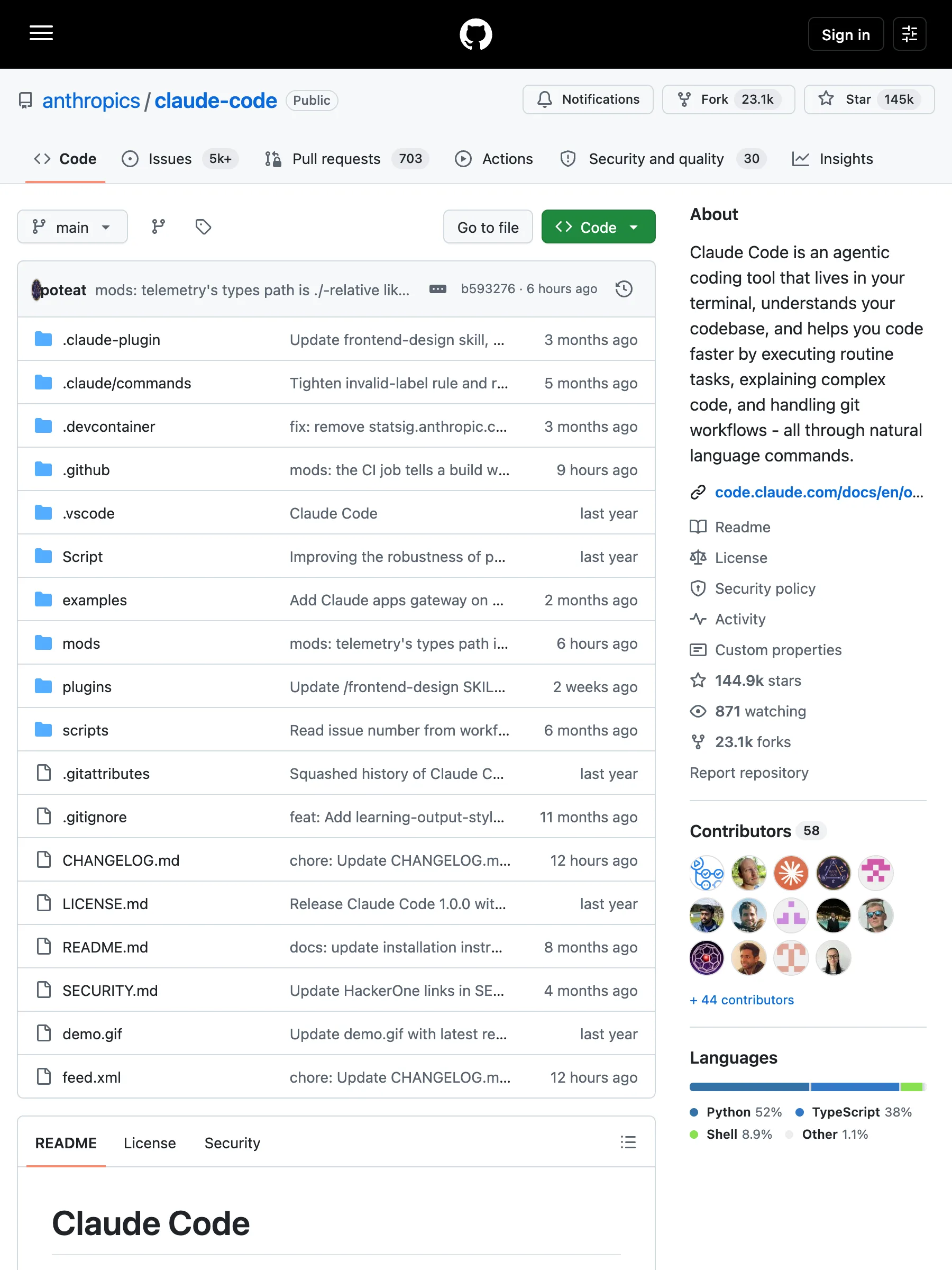
335 KB 的 HTML——文件树、侧栏模块、导航外壳
API 返回的数据
markdown# Claude Code[![npm]](https://www.npmjs.com/package/@anthropic-ai/claude-code)[npm]: https://img.shields.io/npm/v/@anthropic-ai/claude-code.svg?style=flat-squareClaude Code is an agentic coding tool that lives in your terminal, understands your codebase, and helps you code faster by executing routine tasks, explaining complex code, and handling git workflows -- all through natural language commands. Use it in your terminal, IDE, or tag @claude on Github.**Learn more in the [official documentation](https://code.claude.com/docs/en/overview)**.<img src="./demo.gif" />## Get started> [!NOTE]> Installation via npm is deprecated. Use one of the recommended methods below.For more installation options, uninstall steps, and troubleshooting, see the [setup documentation](https://code.claude.com/docs/en/setup).1. Install Claude Code:**MacOS/Linux (Recommended):**```bashcurl -fsSL https://claude.ai/install.sh | bash```**Homebrew (MacOS/Linux):**```bashbrew install --cask claude-code```**Windows (Recommended):**```powershellirm https://claude.ai/install.ps1 | iex```**WinGet (Windows):**```powershellwinget install Anthropic.ClaudeCode```**NPM (Deprecated):**```bashnpm install -g @anthropic-ai/claude-code```2. Navigate to your project directory and run `claude`.## PluginsThis repository includes several Claude Code plugins that extend functionality with custom commands and agents. See the [plugins directory](./plugins/README.md) for detailed documentation on available plugins.## Reporting BugsWe welcome your feedback. Use the `/bug` command to report issues directly within Claude Code, or file a [GitHub issue](https://github.com/anthropics/claude-code/issues).## Connect on DiscordJoin the [Claude Developers Discord](https://anthropic.com/discord) to connect with other developers using Claude Code. Get help, share feedback, and discuss your projects with the community.## Data collection, usage, and retentionWhen you use Claude Code, we collect feedback, which includes usage data (such as code acceptance or rejections), associated conversation data, and user feedback submitted via the `/bug` command.### How we use your dataSee our [data usage policies](https://code.claude.com/docs/en/data-usage).### Privacy safeguardsWe have implemented several safeguards to protect your data, including limited retention periods for sensitive information, restricted access to user session data, and clear policies against using feedback for model training.For full details, please review our [Commercial Terms of Service](https://www.anthropic.com/legal/commercial-terms) and [Privacy Policy](https://www.anthropic.com/legal/privacy).
README 的 Markdown — 2.8 KB,可直接索引
github.com/facebook/react/blob/main/package.jsonGitHub 实际返回的页面
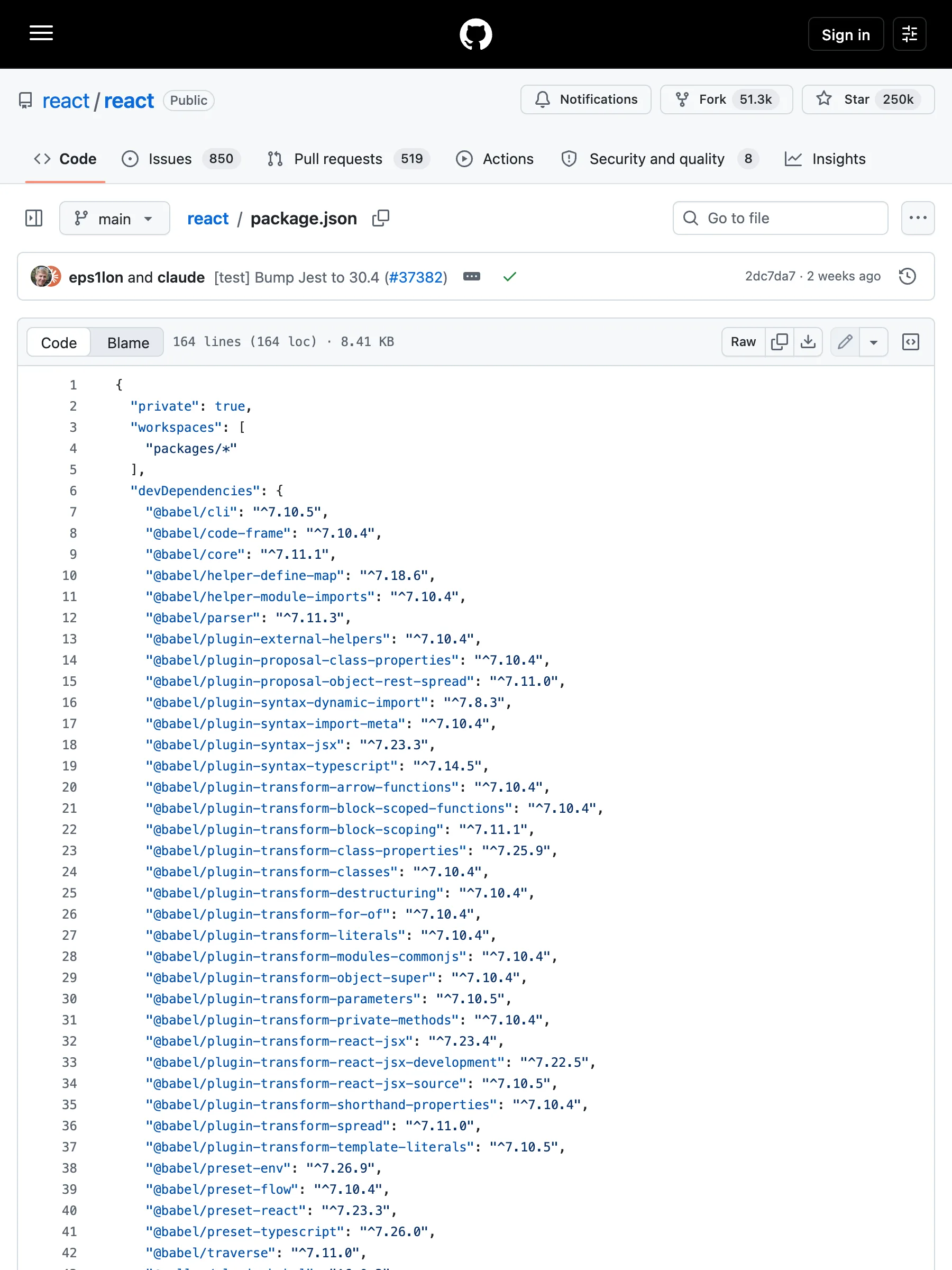
351 KB 的 HTML——行号、blame 栏、编辑按钮
API 返回的数据
markdown# package.json```json{"private": true,"workspaces": ["packages/*"],"devDependencies": {"@babel/cli": "^7.10.5","@babel/code-frame": "^7.10.4","@babel/core": "^7.11.1","@babel/helper-define-map": "^7.18.6","@babel/helper-module-imports": "^7.10.4","@babel/parser": "^7.11.3","@babel/plugin-external-helpers": "^7.10.4","@babel/plugin-proposal-class-properties": "^7.10.4","@babel/plugin-proposal-object-rest-spread": "^7.11.0","@babel/plugin-syntax-dynamic-import": "^7.8.3","@babel/plugin-syntax-import-meta": "^7.10.4","@babel/plugin-syntax-jsx": "^7.23.3","@babel/plugin-syntax-typescript": "^7.14.5","@babel/plugin-transform-arrow-functions": "^7.10.4","@babel/plugin-transform-block-scoped-functions": "^7.10.4","@babel/plugin-transform-block-scoping": "^7.11.1","@babel/plugin-transform-class-properties": "^7.25.9","@babel/plugin-transform-classes": "^7.10.4","@babel/plugin-transform-destructuring": "^7.10.4","@babel/plugin-transform-for-of": "^7.10.4","@babel/plugin-transform-literals": "^7.10.4","@babel/plugin-transform-modules-commonjs": "^7.10.4","@babel/plugin-transform-object-super": "^7.10.4","@babel/plugin-transform-parameters": "^7.10.5","@babel/plugin-transform-private-methods": "^7.10.4","@babel/plugin-transform-react-jsx": "^7.23.4","@babel/plugin-transform-react-jsx-development": "^7.22.5","@babel/plugin-transform-react-jsx-source": "^7.10.5","@babel/plugin-transform-shorthand-properties": "^7.10.4","@babel/plugin-transform-spread": "^7.11.0","@babel/plugin-transform-template-literals": "^7.10.5","@babel/preset-env": "^7.26.9","@babel/preset-flow": "^7.10.4","@babel/preset-react": "^7.23.3","@babel/preset-typescript": "^7.26.0","@babel/traverse": "^7.11.0","@rollup/plugin-babel": "^6.0.3","@rollup/plugin-commonjs": "^24.0.1","@rollup/plugin-node-resolve": "^15.0.1","@rollup/plugin-replace": "^5.0.2","@rollup/plugin-typescript": "^12.1.2","@types/invariant": "^2.2.35","@typescript-eslint/eslint-plugin": "^6.21.0","@typescript-eslint/parser": "^6.21.0","abortcontroller-polyfill": "^1.7.5","art": "0.10.1","babel-jest": "^30.4.1","babel-plugin-syntax-hermes-parser": "^0.36.1","babel-plugin-syntax-trailing-function-commas": "^6.5.0","busboy": "^1.6.0","chalk": "^3.0.0","cli-table": "^0.3.1","coffee-script": "^1.12.7","confusing-browser-globals": "^1.0.9","core-js": "^3.6.4","create-react-class": "^15.6.3","error-stack-parser": "^2.0.6","eslint": "^7.7.0","eslint-config-prettier": "^6.9.0","eslint-plugin-babel": "^5.3.0","eslint-plugin-es": "^4.1.0","eslint-plugin-eslint-plugin": "^3.5.3","eslint-plugin-ft-flow": "^2.0.3","eslint-plugin-jest": "28.4.0","eslint-plugin-no-for-of-loops": "^1.0.0","eslint-plugin-no-function-declare-after-return": "^1.0.0","eslint-plugin-react": "^6.7.1","eslint-plugin-react-hooks-published": "npm:eslint-plugin-react-hooks@^5.2.0","eslint-plugin-react-internal": "link:./scripts/eslint-rules","fbjs-scripts": "^3.0.1","filesize": "^6.0.1","flow-bin": "^0.317.0","flow-remove-types": "^2.317.0","flow-typed": "^4.1.1","glob": "^7.1.6","glob-stream": "^6.1.0","google-closure-compiler": "^20230206.0.0","gzip-size": "^5.1.1","hermes-eslint": "^0.36.1","hermes-parser": "^0.36.1","jest": "^30.4.1","jest-cli": "^30.4.1","jest-diff": "^30.4.1","jest-environment-jsdom": "^30.4.1","jest-silent-reporter": "^0.6.0","jest-snapshot-serializer-raw": "^1.2.0","minimatch": "^3.0.4","minimist": "^1.2.3","mkdirp": "^0.5.1","ncp": "^2.0.0","prettier": "^3.3.3","prettier-plugin-hermes-parser": "^0.36.1","pretty-format": "^30.4.1","prop-types": "^15.6.2","random-seed": "^0.3.0","react-lifecycles-compat": "^3.0.4","rimraf": "^3.0.0","rollup": "^3.29.5","rollup-plugin-dts": "^6.1.1","rollup-plugin-prettier": "^4.1.1","rollup-plugin-strip-banner": "^3.0.0","semver": "^7.1.1","shelljs": "^0.8.5","signedsource": "^2.0.0","targz": "^1.0.1","through2": "^3.0.1","tmp": "^0.1.0","to-fast-properties": "^2.0.0","tsup": "^8.4.0","typescript": "^5.4.3","undici": "^5.28.4","web-streams-polyfill": "^3.1.1","yargs": "^15.3.1"},"jest": {"testRegex": "/scripts/jest/dont-run-jest-directly\\.js$"},"scripts": {"prebuild": "./scripts/react-compiler/link-compiler.sh","build": "node ./scripts/rollup/build-all-release-channels.js","build-for-devtools": "cross-env yarn build react/index,react/jsx,react/compiler-runtime,react-dom/index,react-dom/client,react-dom/unstable_testing,react-dom/test-utils,react-is,react-debug-tools,scheduler,react-test-renderer,react-refresh,react-art --type=NODE --release-channel=experimental","build-for-devtools-dev": "yarn build-for-devtools --type=NODE_DEV","build-for-devtools-prod": "yarn build-for-devtools --type=NODE_PROD","build-for-flight-dev": "cross-env RELEASE_CHANNEL=experimental node ./scripts/rollup/build.js react/index,react/jsx,react.react-server,react-dom/index,react-dom/client,react-dom/server,react-dom.react-server,react-dom-server.node,react-dom-server-legacy.node,scheduler,react-server-dom-webpack/,react-server-dom-unbundled/ --type=NODE_DEV,ESM_PROD,NODE_ES2015 && mv ./build/node_modules ./build/oss-experimental","build-for-flight-prod": "cross-env RELEASE_CHANNEL=experimental node ./scripts/rollup/build.js react/index,react/jsx,react.react-server,react-dom/index,react-dom/client,react-dom/server,react-dom.react-server,react-dom-server.node,react-dom-server-legacy.node,scheduler,react-server-dom-webpack/,react-server-dom-unbundled/ --type=NODE_PROD,ESM_PROD,NODE_ES2015 && mv ./build/node_modules ./build/oss-experimental","build-for-vt-dev": "cross-env RELEASE_CHANNEL=experimental node ./scripts/rollup/build.js react/index,react/jsx,react-dom/index,react-dom/client,react-dom/server,react-dom-server.node,react-dom-server-legacy.node,scheduler --type=NODE_DEV && mv ./build/node_modules ./build/oss-experimental","flow-typed-install": "yarn flow-typed install --skip --skipFlowRestart --ignore-deps=dev","linc": "node ./scripts/tasks/linc.js","lint": "node ./scripts/tasks/eslint.js","lint-build": "node ./scripts/rollup/validate/index.js","extract-errors": "node scripts/error-codes/extract-errors.js","postinstall": "node ./scripts/flow/createFlowConfigs.js","test": "node ./scripts/jest/jest-cli.js","test-stable": "node ./scripts/jest/jest-cli.js --release-channel=stable","test-www": "node ./scripts/jest/jest-cli.js --release-channel=www-modern","test-classic": "node ./scripts/jest/jest-cli.js --release-channel=www-classic","test-build-devtools": "node ./scripts/jest/jest-cli.js --build --project devtools --release-channel=experimental","test-dom-fixture": "cd fixtures/dom && yarn && yarn test","flow": "node ./scripts/tasks/flow.js","flow-ci": "node ./scripts/tasks/flow-ci.js","prettier": "node ./scripts/prettier/index.js write-changed","prettier-all": "node ./scripts/prettier/index.js write","prettier-check": "node ./scripts/prettier/index.js","version-check": "node ./scripts/tasks/version-check.js","publish-prereleases": "echo 'This command has been deprecated. Please refer to https://github.com/facebook/react/tree/main/scripts/release#trigger-an-automated-prerelease'","download-build": "node ./scripts/release/download-experimental-build.js","download-build-for-head": "node ./scripts/release/download-experimental-build.js --commit=$(git rev-parse HEAD)","download-build-in-codesandbox-ci": "yarn build --type=node react/index react.react-server react-dom/index react-dom/client react-dom/src/server react-dom/test-utils react-dom.react-server scheduler/index react/jsx-runtime react/jsx-dev-runtime react-server-dom-webpack","check-release-dependencies": "node ./scripts/release/check-release-dependencies","generate-inline-fizz-runtime": "node ./scripts/rollup/generate-inline-fizz-runtime.js","generate-changelog": "node ./scripts/tasks/generate-changelog/index.js","flags": "node ./scripts/flags/flags.js"},"resolutions": {"react-is": "npm:react-is"},"packageManager": "yarn@1.22.22"}```
围栏代码块 — 8.6 KB 源码
raw.githubusercontent.com/anthropics/claude-code/main/README.mdGitHub 实际返回的页面
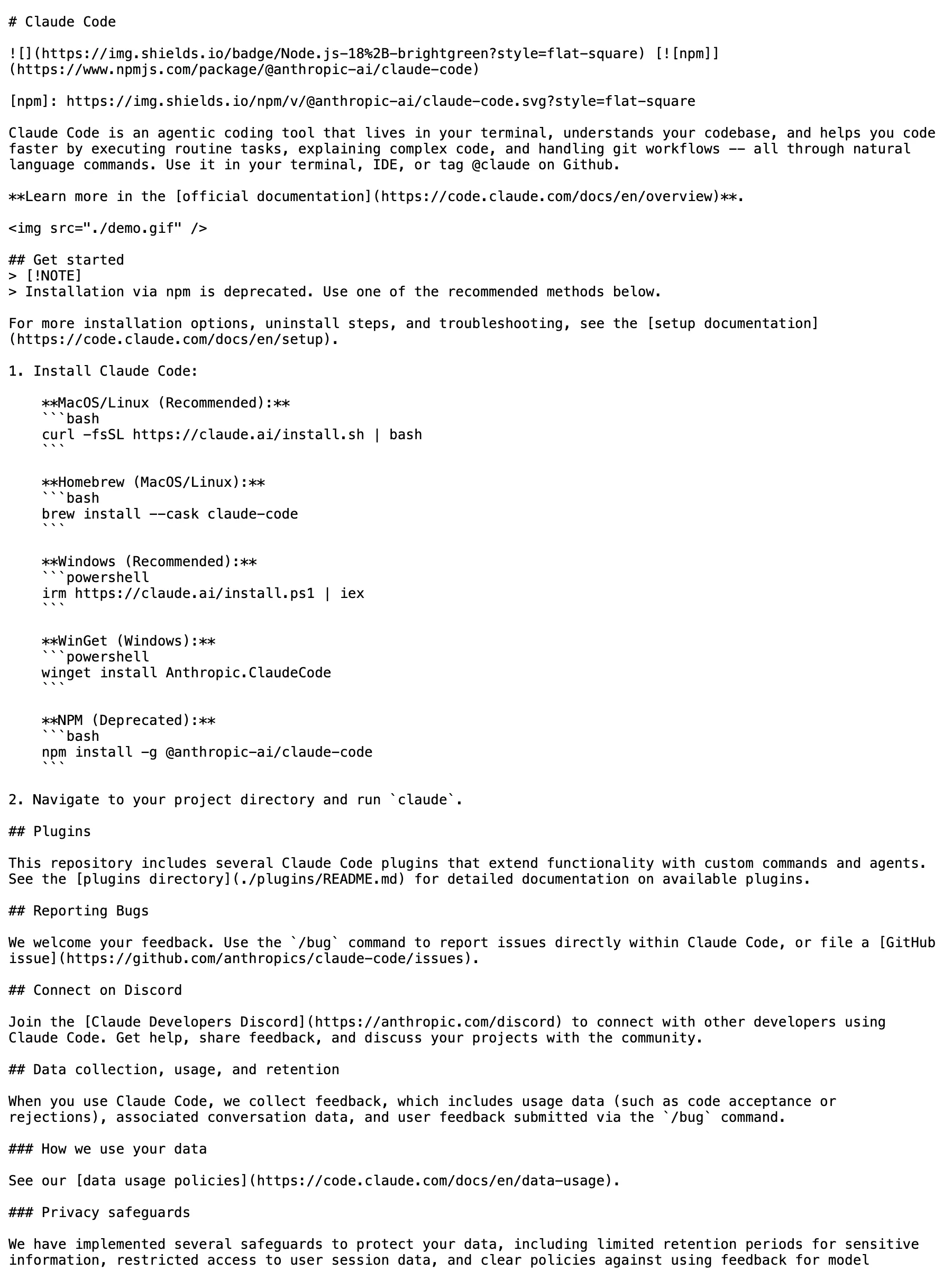
3 KB——原始文件本身就是纯文本
API 返回的数据
markdown# Claude Code[![npm]](https://www.npmjs.com/package/@anthropic-ai/claude-code)[npm]: https://img.shields.io/npm/v/@anthropic-ai/claude-code.svg?style=flat-squareClaude Code is an agentic coding tool that lives in your terminal, understands your codebase, and helps you code faster by executing routine tasks, explaining complex code, and handling git workflows -- all through natural language commands. Use it in your terminal, IDE, or tag @claude on Github.**Learn more in the [official documentation](https://code.claude.com/docs/en/overview)**.<img src="./demo.gif" />## Get started> [!NOTE]> Installation via npm is deprecated. Use one of the recommended methods below.For more installation options, uninstall steps, and troubleshooting, see the [setup documentation](https://code.claude.com/docs/en/setup).1. Install Claude Code:**MacOS/Linux (Recommended):**```bashcurl -fsSL https://claude.ai/install.sh | bash```**Homebrew (MacOS/Linux):**```bashbrew install --cask claude-code```**Windows (Recommended):**```powershellirm https://claude.ai/install.ps1 | iex```**WinGet (Windows):**```powershellwinget install Anthropic.ClaudeCode```**NPM (Deprecated):**```bashnpm install -g @anthropic-ai/claude-code```2. Navigate to your project directory and run `claude`.## PluginsThis repository includes several Claude Code plugins that extend functionality with custom commands and agents. See the [plugins directory](./plugins/README.md) for detailed documentation on available plugins.## Reporting BugsWe welcome your feedback. Use the `/bug` command to report issues directly within Claude Code, or file a [GitHub issue](https://github.com/anthropics/claude-code/issues).## Connect on DiscordJoin the [Claude Developers Discord](https://anthropic.com/discord) to connect with other developers using Claude Code. Get help, share feedback, and discuss your projects with the community.## Data collection, usage, and retentionWhen you use Claude Code, we collect feedback, which includes usage data (such as code acceptance or rejections), associated conversation data, and user feedback submitted via the `/bug` command.### How we use your dataSee our [data usage policies](https://code.claude.com/docs/en/data-usage).### Privacy safeguardsWe have implemented several safeguards to protect your data, including limited retention periods for sensitive information, restricted access to user session data, and clear policies against using feedback for model training.For full details, please review our [Commercial Terms of Service](https://www.anthropic.com/legal/commercial-terms) and [Privacy Policy](https://www.anthropic.com/legal/privacy).
原样返回 — 2.8 KB,逐字节一致的 Markdown
按 URL 形态划分的支持矩阵
GitHub 的支持是按 URL 形态实测出来的,不是按域名笼统宣称的。表里的每一行都已在生产爬虫上验证。
| URL 形态 | 状态 | 返回内容 |
|---|---|---|
/<owner>/<repo> | 支持 | 仓库的 README 以干净 Markdown 返回——要的是文档本体,不是页面外壳。 |
/<owner>/<repo>/blob/<ref>/<path> | 支持 | 文件正文以围栏代码块返回——真实源码,不是渲染后的 HTML。 |
raw.githubusercontent.com/* · gist raw | 支持 | Raw 文件原样返回——本来就是文本,保持文本。 |
绕开页面外壳拿 GitHub 内容
把 GitHub URL 发给 Crawl 接口,请求会路由到一个理解页面用途的转换器:仓库页返回 README,文件视图返回文件本体,raw URL 原样返回字节。导航、文件树、侧栏外壳不会进入你的管线。
要成果物,不要页面
仓库页的意义是展示文件——转换器只返回访客真正要读的 README,剥掉周围一圈外壳。
源码保持源码
文件视图以围栏代码块返回,raw URL 逐字节原样——缩进和格式完整往返。
诚实的边界
Issue、PR、个人主页不在支持范围——专用路径给不出干净结果的形态,矩阵里就不写。
按 URL 形态实测
矩阵每行都是真实 URL 在线爬虫的复现结果——按形态实测,不按域名拍胸脯。
什么是 GitHub 抓取 API?
GitHub 抓取 API 是一个 HTTP 接口:传入 GitHub URL,返回结构化、模型可用的页面真实内容。GitHub 页面很重——一个仓库视图是文件树、侧栏和导航围着一份 README。Search1API 的 Crawl 接口用按 URL 形态映射成果物的转换器:仓库给 README,文件视图给围栏源码,raw 文件逐字节给。拿到的是可以直接索引或喂给模型的内容,不需要自己写每站一套的清洗规则。
典型工作流
把公开 GitHub URL 发给 Crawl 接口,拿回干净 Markdown——仓库页返回 README,文件视图返回围栏源码,raw URL 原样返回文件。无需 GitHub 账号。
把 GitHub URL POST 给 Crawl 接口——不需要 GitHub 账号。
URL 按形态规则匹配,路由到 GitHub 转换器。
仓库页返回 README Markdown;文件视图返回围栏源码;raw URL 原样返回文件。
给不出干净结果的形态不在宣称范围——矩阵就是边界,全部经在线请求验证。
典型用法
采集依赖树或某个组织公开仓库的 README,灌进文档搜索。
把源码文件以围栏代码块形式送入代码感知管线。
跟踪上游项目——仓库 URL 每次调用都返回当前 README。
raw 配置和文档文件不经 HTML 清洗直接进检索。
常见问题
需要 GitHub 账号或 token 吗?
不需要——这里只读匿名访客能打开的公开页面。私有仓库和需要登录的内容本来就在范围外。
支持哪些 GitHub URL?
仓库根路径、blob 文件视图、raw.githubusercontent.com。Issue、PR、Release、个人主页不在已验证矩阵内。
仓库页返回什么?
干净 Markdown 的 README——读者真正要的成果物。文件列表、侧栏、导航外壳由专用转换器剥除。
和 GitHub API 有什么区别?
REST API 要有 token 才有可用的速率额度,返回的还是需要自己渲染或逐文件再取的 JSON。这条路直接拿你手上的 URL,一次调用返回可读的成果物——Markdown 进,Markdown 出。
monorepo 和大文件支持吗?
文件视图无论仓库结构都返回文件正文。超大文件遵循与其他 Crawl 响应相同的内容大小限制。
抓 GitHub 合法吗?
我们只取 GitHub 向匿名访客提供的内容——不登录、不共享会话、不绕过访问控制。具体用途是否合法取决于你的法域和场景,请与自己的法务确认。