PyPI 项目页面转 Markdown

面向项目页面的 PyPI 抓取 API

把 PyPI 项目 URL 发给 Crawl 接口,拿回结构化 Markdown——项目描述加 License、requires-python 和依赖列表。含版本固定 URL。

接口bash
POST https://api.search1api.com/crawl
{ "url": "https://pypi.org/project/fastapi/" }
可以抓什么

适配器读 pypi.org/pypi/<name>/json——README 和 metadata,没有网页包在外面的版本历史侧栏。

1
项目页面

描述转 Markdown——License、requires-python、发布日期进 metadata。

2
版本固定发布

/project/<name>/<version>/ URL 返回那个确切版本——它的描述和依赖。

3
依赖成列表

安装依赖渲染成干净的列表——extras 和环境标记原样保留。

适用场景

依赖调研 / 包发现 / 版本审计

输入什么,返回什么

两种 URL 形态:左边是 PyPI 实际返回页面的真实匿名截图,右边是 API 返回的 results.content 全文。

项目页面pypi.org/project/fastapi/

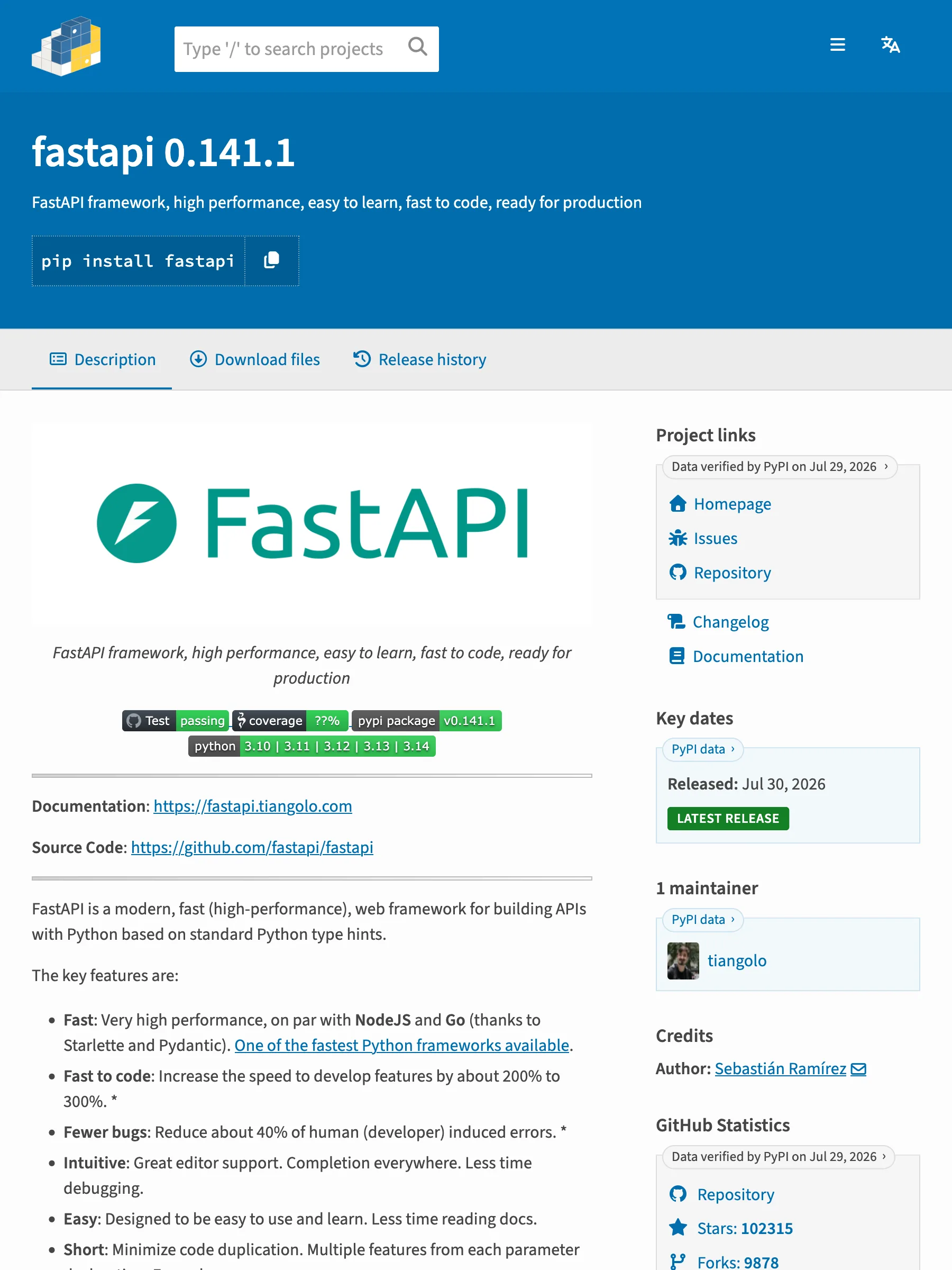
PyPI 实际返回的页面

PyPI 的 fastapi 项目页面,带 pip install 行、项目链接和统计侧栏

472 KB 渲染 HTML——描述被版本历史、项目链接和统计侧栏包裹

API 返回的数据

markdown
# fastapi 0.141.1
FastAPI framework, high performance, easy to learn, fast to code, ready for production
License: MIT · Requires Python: >=3.10 · Released: 2026-07-29 · Homepage: https://github.com/fastapi/fastapi · Source: https://github.com/fastapi/fastapi · Documentation: https://fastapi.tiangolo.com/
```
pip install fastapi
```
## Requirements (32)
- starlette>=0.46.0
- pydantic>=2.9.0
- typing-extensions>=4.8.0
- typing-inspection>=0.4.2
- annotated-doc>=0.0.2
- fastapi-cli[standard]>=0.0.32; extra == "standard"
- fastar>=0.9.0; extra == "standard"
- httpx<1.0.0,>=0.23.0; extra == "standard"
- jinja2>=3.1.5; extra == "standard"
- python-multipart>=0.0.18; extra == "standard"
- email-validator>=2.0.0; extra == "standard"
- uvicorn[standard]>=0.12.0; extra == "standard"
- pydantic-settings>=2.0.0; extra == "standard"
- pydantic-extra-types>=2.0.0; extra == "standard"
- fastapi-cli[standard-no-fastapi-cloud-cli]>=0.0.32; extra == "standard-no-fastapi-cloud-cli"
- httpx<1.0.0,>=0.23.0; extra == "standard-no-fastapi-cloud-cli"
- jinja2>=3.1.5; extra == "standard-no-fastapi-cloud-cli"
- python-multipart>=0.0.18; extra == "standard-no-fastapi-cloud-cli"
- email-validator>=2.0.0; extra == "standard-no-fastapi-cloud-cli"
- uvicorn[standard]>=0.12.0; extra == "standard-no-fastapi-cloud-cli"
- pydantic-settings>=2.0.0; extra == "standard-no-fastapi-cloud-cli"
- pydantic-extra-types>=2.0.0; extra == "standard-no-fastapi-cloud-cli"
- fastapi-cli[standard]>=0.0.32; extra == "all"
- httpx<1.0.0,>=0.23.0; extra == "all"
- jinja2>=3.1.5; extra == "all"
- python-multipart>=0.0.18; extra == "all"
- itsdangerous>=1.1.0; extra == "all"
- pyyaml>=5.3.1; extra == "all"
- email-validator>=2.0.0; extra == "all"
- uvicorn[standard]>=0.12.0; extra == "all"
- pydantic-settings>=2.0.0; extra == "all"
- pydantic-extra-types>=2.0.0; extra == "all"
## Description
<p align="center">
<a href="https://fastapi.tiangolo.com"><img src="https://fastapi.tiangolo.com/img/logo-margin/logo-teal.png" alt="FastAPI"></a>
</p>
<p align="center">
<em>FastAPI framework, high performance, easy to learn, fast to code, ready for production</em>
</p>
<p align="center">
<a href="https://github.com/fastapi/fastapi/actions?query=workflow%3ATest+event%3Apush+branch%3Amaster">
<img src="https://github.com/fastapi/fastapi/actions/workflows/test.yml/badge.svg?event=push&branch=master" alt="Test">
</a>
<a href="https://coverage-badge.samuelcolvin.workers.dev/redirect/fastapi/fastapi">
<img src="https://coverage-badge.samuelcolvin.workers.dev/fastapi/fastapi.svg" alt="Coverage">
</a>
<a href="https://pypi.org/project/fastapi">
<img src="https://img.shields.io/pypi/v/fastapi?color=%2334D058&label=pypi%20package" alt="Package version">
</a>
<a href="https://pypi.org/project/fastapi">
<img src="https://img.shields.io/pypi/pyversions/fastapi.svg?color=%2334D058" alt="Supported Python versions">
</a>
</p>
---
**Documentation**: [https://fastapi.tiangolo.com](https://fastapi.tiangolo.com)
**Source Code**: [https://github.com/fastapi/fastapi](https://github.com/fastapi/fastapi)
---
FastAPI is a modern, fast (high-performance), web framework for building APIs with Python based on standard Python type hints.
The key features are:
* **Fast**: Very high performance, on par with **NodeJS** and **Go** (thanks to Starlette and Pydantic). One of the fastest Python frameworks available.
* **Fast to code**: Increase the speed to develop features by about 200% to 300%. *
* **Fewer bugs**: Reduce about 40% of human (developer) induced errors. *
* **Intuitive**: Great editor support. <dfn title="also known as auto-complete, autocompletion, IntelliSense">Completion</dfn> everywhere. Less time debugging.
* **Easy**: Designed to be easy to use and learn. Less time reading docs.
* **Short**: Minimize code duplication. Multiple features from each parameter declaration. Fewer bugs.
* **Robust**: Get production-ready code. With automatic interactive documentation.
* **Standards-based**: Based on (and fully compatible with) the open standards for APIs: [OpenAPI](https://github.com/OAI/OpenAPI-Specification) (previously known as Swagger) and [JSON Schema](https://json-schema.org/).
<small>* estimation based on tests conducted by an internal development team, building production applications.</small>
## Sponsors
<!-- sponsors -->
### Keystone Sponsor
<a href="https://fastapicloud.com" target="_blank" title="FastAPI Cloud. By the same team behind FastAPI. You code. We Cloud."><img src="https://fastapi.tiangolo.com/img/sponsors/fastapicloud.png"></a>
### Gold Sponsors
<a href="https://blockbee.io?ref=fastapi" target="_blank" title="BlockBee Cryptocurrency Payment Gateway"><img src="https://fastapi.tiangolo.com/img/sponsors/blockbee.png"></a>
<a href="https://www.propelauth.com/?utm_source=fastapi&utm_campaign=1223&utm_medium=mainbadge" target="_blank" title="Auth, user management and more for your B2B product"><img src="https://fastapi.tiangolo.com/img/sponsors/propelauth.png"></a>
<a href="https://docs.render.com/deploy-fastapi?utm_source=deploydoc&utm_medium=referral&utm_campaign=fastapi" target="_blank" title="Deploy & scale any full-stack web app on Render. Focus on building apps, not infra."><img src="https://fastapi.tiangolo.com/img/sponsors/render.svg"></a>
<a href="https://www.coderabbit.ai/?utm_source=fastapi&utm_medium=badge&utm_campaign=fastapi" target="_blank" title="Cut Code Review Time & Bugs in Half with CodeRabbit"><img src="https://fastapi.tiangolo.com/img/sponsors/coderabbit.png"></a>
<a href="https://subtotal.com/?utm_source=fastapi&utm_medium=sponsorship&utm_campaign=open-source" target="_blank" title="The Gold Standard in Retail Account Linking"><img src="https://fastapi.tiangolo.com/img/sponsors/subtotal.svg"></a>
<a href="https://docs.railway.com/guides/fastapi?utm_medium=integration&utm_source=docs&utm_campaign=fastapi" target="_blank" title="Deploy enterprise applications at startup speed"><img src="https://fastapi.tiangolo.com/img/sponsors/railway.png"></a>
<a href="https://serpapi.com/?utm_source=fastapi_website" target="_blank" title="SerpApi: Web Search API"><img src="https://fastapi.tiangolo.com/img/sponsors/serpapi.png"></a>
<a href="https://www.greptile.com/?utm_source=fastapi&utm_medium=sponsorship&utm_campaign=fastapi_sponsor_page" target="_blank" title="Greptile: The AI Code Reviewer"><img src="https://fastapi.tiangolo.com/img/sponsors/greptile.png"></a>
### Silver Sponsors
<a href="https://databento.com/?utm_source=fastapi&utm_medium=sponsor&utm_content=display" target="_blank" title="Pay as you go for market data"><img src="https://fastapi.tiangolo.com/img/sponsors/databento.svg"></a>
<a href="https://www.svix.com/" target="_blank" title="Svix - Webhooks as a service"><img src="https://fastapi.tiangolo.com/img/sponsors/svix.svg"></a>
<a href="https://www.permit.io/blog/implement-authorization-in-fastapi?utm_source=github&utm_medium=referral&utm_campaign=fastapi" target="_blank" title="Fine-Grained Authorization for FastAPI"><img src="https://fastapi.tiangolo.com/img/sponsors/permit.png"></a>
<a href="https://dribia.com/en/" target="_blank" title="Dribia - Data Science within your reach"><img src="https://fastapi.tiangolo.com/img/sponsors/dribia.png"></a>
<a href="https://www.bairesdev.com/" target="_blank" title="BairesDev | Nearshore Software Development & Staff Augmentation Company"><img src="https://fastapi.tiangolo.com/img/sponsors/bairesdev.svg"></a>
<a href="https://tutorcruncher.com/?utm_source=fastapi" target="_blank" title="TutorCruncher"><img src="https://fastapi.tiangolo.com/img/sponsors/tutorcruncher.png"></a>
<!-- /sponsors -->
[Other sponsors](https://fastapi.tiangolo.com/fastapi-people/#sponsors)
## Opinions
<div class="only-github" markdown="1">
"_[...] I'm using **FastAPI** a ton these days. [...] I'm actually planning to use it for all of my team's **ML services at Microsoft**. Some of them are getting integrated into the core **Windows** product and some **Office** products._"
<div style="text-align: right; margin-right: 10%;">Kabir Khan - <strong>Microsoft</strong> <a href="https://github.com/fastapi/fastapi/pull/26"><small>(ref)</small></a></div>
---
"_We adopted the **FastAPI** library to spawn a **REST** server that can be queried to obtain **predictions**. [for Ludwig]_"
<div style="text-align: right; margin-right: 10%;">Piero Molino, Yaroslav Dudin, and Sai Sumanth Miryala - <strong>Uber</strong> <a href="https://www.uber.com/us/en/blog/ludwig-v0-2/"><small>(ref)</small></a></div>
---
"_**Netflix** is pleased to announce the open-source release of our **crisis management** orchestration framework: **Dispatch**! [built with **FastAPI**]_"
<div style="text-align: right; margin-right: 10%;">Kevin Glisson, Marc Vilanova, Forest Monsen - <strong>Netflix</strong> <a href="https://netflixtechblog.com/introducing-dispatch-da4b8a2a8072"><small>(ref)</small></a></div>
---
"_If anyone is looking to build a production Python API, I would highly recommend **FastAPI**. It is **beautifully designed**, **simple to use** and **highly scalable**, it has become a **key component** in our API first development strategy and is driving many automations and services such as our Virtual TAC Engineer._"
<div style="text-align: right; margin-right: 10%;">Deon Pillsbury - <strong>Cisco</strong> <a href="https://www.linkedin.com/posts/deonpillsbury_cisco-cx-python-activity-6963242628536487936-trAp/"><small>(ref)</small></a></div>
---
</div>
## FastAPI Conf
[**FastAPI Conf '26**](https://fastapiconf.com) is happening on **October 28, 2026** in **Amsterdam, NL**. All about FastAPI, right from the source. 🎤
<a class="fastapi-feature-banner" href="https://fastapiconf.com"><img src="https://fastapi.tiangolo.com/img/fastapi-conf.jpeg" alt="FastAPI Conf '26 - October 28, 2026 - Amsterdam, NL"></a>
## FastAPI mini documentary
There's a [FastAPI mini documentary](https://www.youtube.com/watch?v=mpR8ngthqiE) released at the end of 2025, you can watch it online:
<a class="fastapi-feature-banner" href="https://www.youtube.com/watch?v=mpR8ngthqiE"><img src="https://fastapi.tiangolo.com/img/fastapi-documentary.jpg" alt="FastAPI Mini Documentary"></a>
## **Typer**, the FastAPI of CLIs
<a href="https://typer.tiangolo.com"><img src="https://typer.tiangolo.com/img/logo-margin/logo-margin-vector.svg" style="width: 20%;"></a>
If you are building a <abbr title="Command Line Interface">CLI</abbr> app to be used in the terminal instead of a web API, check out [**Typer**](https://typer.tiangolo.com/).
**Typer** is FastAPI's little sibling. And it's intended to be the **FastAPI of CLIs**. ⌨️ 🚀
## Requirements
FastAPI stands on the shoulders of giants:
* [Starlette](https://starlette.dev/) for the web parts.
* [Pydantic](https://pydantic.dev/docs/) for the data parts.
## Installation
First, [install `uv`](https://docs.astral.sh/uv/getting-started/installation/), and then add FastAPI to your project:
<div class="termy">
```console
$ uv add "fastapi[standard]"
---> 100%
```
</div>
**Note**: Make sure you put `"fastapi[standard]"` in quotes to ensure it works in all terminals.
If you prefer to use `pip`, install `fastapi[standard]` inside a virtual environment. See the [installation guide](tutorial/#install-fastapi) for the alternative steps.
## Example
### Create it
Create a file `main.py` with:
```Python
from fastapi import FastAPI
app = FastAPI()
@app.get("/")
def read_root():
return {"Hello": "World"}
@app.get("/items/{item_id}")
def read_item(item_id: int, q: str | None = None):
return {"item_id": item_id, "q": q}
```
<details markdown="1">
<summary>Or use <code>async def</code>...</summary>
If your code uses `async` / `await`, use `async def`:
```Python hl_lines="7 12"
from fastapi import FastAPI
app = FastAPI()
@app.get("/")
async def read_root():
return {"Hello": "World"}
@app.get("/items/{item_id}")
async def read_item(item_id: int, q: str | None = None):
return {"item_id": item_id, "q": q}
```
**Note**:
If you don't know, check the _"In a hurry?"_ section about [`async` and `await` in the docs](https://fastapi.tiangolo.com/async/#in-a-hurry).
</details>
### Run it
Run the server with:
<div class="termy">
```console
$ uv run fastapi dev
╭────────── FastAPI CLI - Development mode ───────────╮
│ │
│ Serving at: http://127.0.0.1:8000 │
│ │
│ API docs: http://127.0.0.1:8000/docs │
│ │
│ Running in development mode, for production use: │
│ │
│ fastapi run │
│ │
╰─────────────────────────────────────────────────────╯
INFO: Will watch for changes in these directories: ['/home/user/code/awesomeapp']
INFO: Uvicorn running on http://127.0.0.1:8000 (Press CTRL+C to quit)
INFO: Started reloader process [2248755] using WatchFiles
INFO: Started server process [2248757]
INFO: Waiting for application startup.
INFO: Application startup complete.
```
</div>
<details markdown="1">
<summary>About the command <code>fastapi dev</code>...</summary>
The command `fastapi dev` reads your `main.py` file automatically, detects the **FastAPI** app in it, and starts a server using [Uvicorn](https://uvicorn.dev).
By default, `fastapi dev` will start with auto-reload enabled for local development.
You can read more about it in the [FastAPI CLI docs](https://fastapi.tiangolo.com/fastapi-cli/).
</details>
### Check it
Open your browser at [http://127.0.0.1:8000/items/5?q=somequery](http://127.0.0.1:8000/items/5?q=somequery).
You will see the JSON response as:
```JSON
{"item_id": 5, "q": "somequery"}
```
You already created an API that:
* Receives HTTP requests in the _paths_ `/` and `/items/{item_id}`.
* Both _paths_ take `GET` <em>operations</em> (also known as HTTP _methods_).
* The _path_ `/items/{item_id}` has a _path parameter_ `item_id` that should be an `int`.
* The _path_ `/items/{item_id}` has an optional `str` _query parameter_ `q`.
### Interactive API docs
Now go to [http://127.0.0.1:8000/docs](http://127.0.0.1:8000/docs).
You will see the automatic interactive API documentation (provided by [Swagger UI](https://github.com/swagger-api/swagger-ui)):
Swagger UI
### Alternative API docs
And now, go to [http://127.0.0.1:8000/redoc](http://127.0.0.1:8000/redoc).
You will see the alternative automatic documentation (provided by [ReDoc](https://github.com/Redocly/redoc)):
ReDoc
## Example upgrade
Now modify the file `main.py` to receive a body from a `PUT` request.
Declare the body using standard Python types, thanks to Pydantic.
```Python hl_lines="2 7-10 23-25"
from fastapi import FastAPI
from pydantic import BaseModel
app = FastAPI()
class Item(BaseModel):
name: str
price: float
is_offer: bool | None = None
@app.get("/")
def read_root():
return {"Hello": "World"}
@app.get("/items/{item_id}")
def read_item(item_id: int, q: str | None = None):
return {"item_id": item_id, "q": q}
@app.put("/items/{item_id}")
def update_item(item_id: int, item: Item):
return {"item_name": item.name, "item_id": item_id}
```
The `fastapi dev` server should reload automatically.
### Interactive API docs upgrade
Now go to [http://127.0.0.1:8000/docs](http://127.0.0.1:8000/docs).
* The interactive API documentation will be automatically updated, including the new body:
Swagger UI
* Click on the button "Try it out", it allows you to fill the parameters and directly interact with the API:
Swagger UI interaction
* Then click on the "Execute" button, the user interface will communicate with your API, send the parameters, get the results and show them on the screen:
Swagger UI interaction
### Alternative API docs upgrade
And now, go to [http://127.0.0.1:8000/redoc](http://127.0.0.1:8000/redoc).
* The alternative documentation will also reflect the new query parameter and body:
ReDoc
### Recap
In summary, you declare **once** the types of parameters, body, etc. as function parameters.
You do that with standard modern Python types.
You don't have to learn a new syntax, the methods or classes of a specific library, etc.
Just standard **Python**.
For example, for an `int`:
```Python
item_id: int
```
or for a more complex `Item` model:
```Python
item: Item
```
...and with that single declaration you get:
* Editor support, including:
* Completion.
* Type checks.
* Validation of data:
* Automatic and clear errors when the data is invalid.
* Validation even for deeply nested JSON objects.
* <dfn title="also known as: serialization, parsing, marshalling">Conversion</dfn> of input data: coming from the network to Python data and types. Reading from:
* JSON.
* Path parameters.
* Query parameters.
* Cookies.
* Headers.
* Forms.
* Files.
* <dfn title="also known as: serialization, parsing, marshalling">Conversion</dfn> of output data: converting from Python data and types to network data (as JSON):
* Convert Python types (`str`, `int`, `float`, `bool`, `list`, etc).
* `datetime` objects.
* `UUID` objects.
* Database models.
* ...and many more.
* Automatic interactive API documentation, including 2 alternative user interfaces:
* Swagger UI.
* ReDoc.
---
Coming back to the previous code example, **FastAPI** will:
* Validate that there is an `item_id` in the path for `GET` and `PUT` requests.
* Validate that the `item_id` is of type `int` for `GET` and `PUT` requests.
* If it is not, the client will see a useful, clear error.
* Check if there is an optional query parameter named `q` (as in `http://127.0.0.1:8000/items/foo?q=somequery`) for `GET` requests.
* As the `q` parameter is declared with `= None`, it is optional.
* Without the `None` it would be required (as is the body in the case with `PUT`).
* For `PUT` requests to `/items/{item_id}`, read the body as JSON:
* Check that it has a required attribute `name` that should be a `str`.
* Check that it has a required attribute `price` that has to be a `float`.
* Check that it has an optional attribute `is_offer`, that should be a `bool`, if present.
* All this would also work for deeply nested JSON objects.
* Convert from and to JSON automatically.
* Document everything with OpenAPI, that can be used by:
* Interactive documentation systems.
* Automatic client code generation systems, for many languages.
* Provide 2 interactive documentation web interfaces directly.
---
We just scratched the surface, but you already get the idea of how it all works.
Try changing the line with:
```Python
return {"item_name": item.name, "item_id": item_id}
```
...from:
```Python
... "item_name": item.name ...
```
...to:
```Python
... "item_price": item.price ...
```
...and see how your editor will auto-complete the attributes and know their types:
editor support
For a more complete example including more features, see the <a href="https://fastapi.tiangolo.com/tutorial/">Tutorial - User Guide</a>.
**Spoiler alert**: the tutorial - user guide includes:
* Declaration of **parameters** from other different places such as: **headers**, **cookies**, **form fields** and **files**.
* How to set **validation constraints** such as `maximum_length` or `regex`.
* A very powerful and easy to use **<dfn title="also known as components, resources, providers, services, injectables">Dependency Injection</dfn>** system.
* Security and authentication, including support for **OAuth2** with **JWT tokens** and **HTTP Basic** auth.
* More advanced (but equally easy) techniques for declaring **deeply nested JSON models** (thanks to Pydantic).
* **GraphQL** integration with [Strawberry](https://strawberry.rocks) and other libraries.
* Many extra features (thanks to Starlette) such as:
* **WebSockets**
* extremely easy tests based on HTTPX and `pytest`
* **CORS**
* **Cookie Sessions**
* ...and more.
### Deploy your app (optional)
You can optionally deploy your FastAPI app to [FastAPI Cloud](https://fastapicloud.com) with a single command. 🚀
<div class="termy">
```console
$ uv run fastapi deploy
Deploying to FastAPI Cloud...
✅ Deployment successful!
🐔 Ready the chicken! Your app is ready at https://myapp.fastapicloud.dev
```
</div>
The CLI will automatically detect your FastAPI application and deploy it to the cloud. If you are not logged in, your browser will open to complete the authentication process.
That's it! Now you can access your app at that URL. ✨
#### About FastAPI Cloud
**[FastAPI Cloud](https://fastapicloud.com)** is built by the same author and team behind **FastAPI**.
It streamlines the process of **building**, **deploying**, and **accessing** an API with minimal effort.
It brings the same **developer experience** of building apps with FastAPI to **deploying** them to the cloud. 🎉
FastAPI Cloud is the primary sponsor and funding provider for the *FastAPI and friends* open source projects. ✨
#### Deploy to other cloud providers
FastAPI is open source and based on standards. You can deploy FastAPI apps to any cloud provider you choose.
Follow your cloud provider's guides to deploy FastAPI apps with them. 🤓
## Performance
Independent TechEmpower benchmarks show **FastAPI** applications running under Uvicorn as [one of the fastest Python frameworks available](https://www.techempower.com/benchmarks/#section=test&runid=7464e520-0dc2-473d-bd34-dbdfd7e85911&hw=ph&test=query&l=zijzen-7), only below Starlette and Uvicorn themselves (used internally by FastAPI). (*)
To understand more about it, see the section [Benchmarks](https://fastapi.tiangolo.com/benchmarks/).
## Dependencies
FastAPI depends on Pydantic and Starlette.
### `standard` Dependencies
When you install FastAPI with `uv add "fastapi[standard]"` it comes with the `standard` group of optional dependencies:
Used by Pydantic:
* [`email-validator`](https://github.com/JoshData/python-email-validator) - for email validation.
Used by Starlette:
* [`httpx`](https://www.python-httpx.org) - Required if you want to use the `TestClient`.
* [`jinja2`](https://jinja.palletsprojects.com) - Required if you want to use the default template configuration.
* [`python-multipart`](https://github.com/Kludex/python-multipart) - Required if you want to support form <dfn title="converting the string that comes from an HTTP request into Python data">"parsing"</dfn>, with `request.form()`.
Used by FastAPI:
* [`uvicorn`](https://uvicorn.dev) - for the server that loads and serves your application. This includes `uvicorn[standard]`, which includes some dependencies (e.g. `uvloop`) needed for high performance serving.
* `fastapi-cli[standard]` - to provide the `fastapi` command.
* This includes `fastapi-cloud-cli`, which allows you to deploy your FastAPI application to [FastAPI Cloud](https://fastapicloud.com).
### Without `standard` Dependencies
If you don't want to include the `standard` optional dependencies, you can install with `uv add fastapi` instead of `uv add "fastapi[standard]"`.
### Without `fastapi-cloud-cli`
If you want to install FastAPI with the standard dependencies but without the `fastapi-cloud-cli`, you can install with `uv add "fastapi[standard-no-fastapi-cloud-cli]"`.
### Additional Optional Dependencies
There are some additional dependencies you might want to install.
Additional optional Pydantic dependencies:
* [`pydantic-settings`](https://pydantic.dev/docs/validation/latest/concepts/pydantic_settings/) - for settings management.
* [`pydantic-extra-types`](https://github.com/pydantic/pydantic-extra-types) - for extra types to be used with Pydantic.
Additional optional FastAPI dependencies:
* [`orjson`](https://github.com/ijl/orjson) - Required if you want to use `ORJSONResponse`.
* [`ujson`](https://github.com/ultrajson/ultrajson) - Required if you want to use `UJSONResponse`.
## License
This project is licensed under the terms of the MIT license.

项目卡片 + 描述 — 24 KB · fastapi 0.141.1 · MIT · 32 个依赖

版本固定发布pypi.org/project/django/5.2/

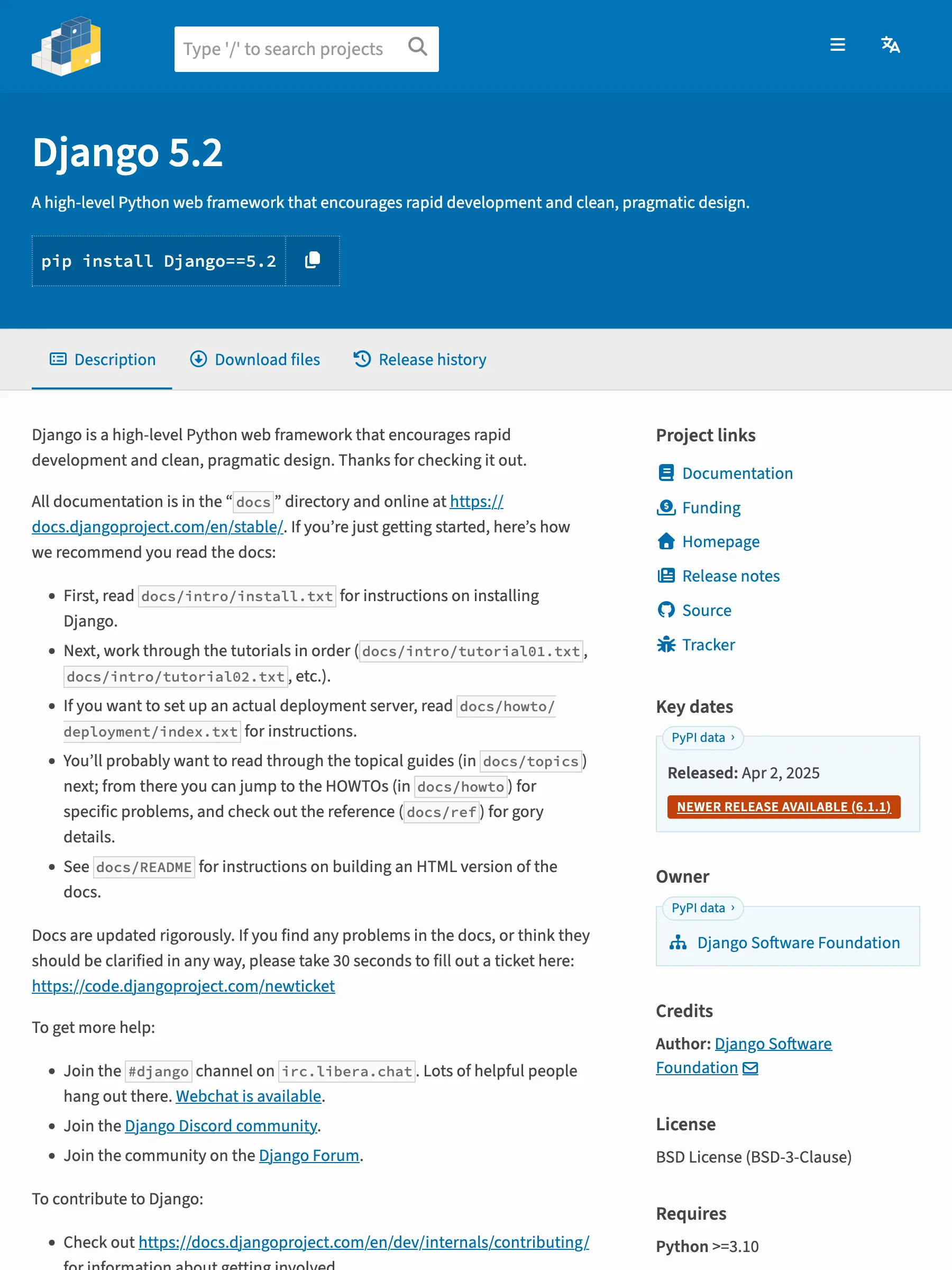
PyPI 实际返回的页面

PyPI 的 Django 5.2 版本固定发布页面

581 KB 渲染 HTML——同一布局固定到 5.2 版本

API 返回的数据

markdown
# Django 5.2
A high-level Python web framework that encourages rapid development and clean, pragmatic design.
License: BSD-3-Clause · Requires Python: >=3.10 · Released: 2025-04-02 · Homepage: https://www.djangoproject.com/ · Source: https://github.com/django/django · Documentation: https://docs.djangoproject.com/
```
pip install django==5.2
```
## Requirements (5)
- asgiref>=3.8.1
- sqlparse>=0.3.1
- tzdata; sys_platform == "win32"
- argon2-cffi>=19.1.0; extra == "argon2"
- bcrypt; extra == "bcrypt"
## Description
======
Django
======
Django is a high-level Python web framework that encourages rapid development
and clean, pragmatic design. Thanks for checking it out.
All documentation is in the "``docs``" directory and online at
https://docs.djangoproject.com/en/stable/. If you're just getting started,
here's how we recommend you read the docs:
* First, read ``docs/intro/install.txt`` for instructions on installing Django.
* Next, work through the tutorials in order (``docs/intro/tutorial01.txt``,
``docs/intro/tutorial02.txt``, etc.).
* If you want to set up an actual deployment server, read
``docs/howto/deployment/index.txt`` for instructions.
* You'll probably want to read through the topical guides (in ``docs/topics``)
next; from there you can jump to the HOWTOs (in ``docs/howto``) for specific
problems, and check out the reference (``docs/ref``) for gory details.
* See ``docs/README`` for instructions on building an HTML version of the docs.
Docs are updated rigorously. If you find any problems in the docs, or think
they should be clarified in any way, please take 30 seconds to fill out a
ticket here: https://code.djangoproject.com/newticket
To get more help:
* Join the ``#django`` channel on ``irc.libera.chat``. Lots of helpful people
hang out there. `Webchat is available <https://web.libera.chat/#django>`_.
* Join the `Django Discord community <https://chat.djangoproject.com>`_.
* Join the community on the `Django Forum <https://forum.djangoproject.com/>`_.
To contribute to Django:
* Check out https://docs.djangoproject.com/en/dev/internals/contributing/ for
information about getting involved.
To run Django's test suite:
* Follow the instructions in the "Unit tests" section of
``docs/internals/contributing/writing-code/unit-tests.txt``, published online at
https://docs.djangoproject.com/en/dev/internals/contributing/writing-code/unit-tests/#running-the-unit-tests
Supporting the Development of Django
====================================
Django's development depends on your contributions.
If you depend on Django, remember to support the Django Software Foundation: https://www.djangoproject.com/fundraising/

确切版本 — 2.7 KB · Django 5.2 · requires-python >=3.10 · 该版本的依赖

按 URL 形态的覆盖情况

PyPI 支持按 URL 形态实测,不按域名笼统宣称。表中每一行都在线上爬虫上验证过。

URL 形态状态返回内容
/project/<name>/
支持
最新版本——描述转 Markdown,License、requires-python、发布日期、依赖列表齐全。
/project/<name>/<version>/
支持
版本固定返回那个确切版本——它的描述和依赖列表,适合审计和 diff。

没有侧栏噪音的项目卡片

PyPI 网页把项目描述包在版本历史侧栏里——几万字符里一半是版本链接。把项目 URL 发给 Crawl 接口,请求会被路由到读取 pypi.org/pypi/<name>/json 的专用适配器——只返回 README 和 metadata 记录,没有别的。

走 JSON API,不要侧栏

适配器读 pypi.org 的 JSON API——拿到描述和 metadata 记录,不带版本链接的壳。

卡片加描述

Markdown 开头是项目卡片——名称、版本、License、requires-python——下面接描述全文。

依赖成列表

安装依赖渲染成干净的列表——extras 和环境标记完整保留。

按 URL 形态实测

矩阵每行都是真实 URL 的实测复现——按形态实测,不按域名笼统宣称。

什么是 PyPI 抓取 API?

PyPI 抓取 API 是一个 HTTP 接口:给它一个 PyPI 项目 URL,返回结构化、可直接喂给模型的项目页面。网页把描述嵌在导航和版本历史侧栏里,实质内容是项目记录——README、License、requires-python、依赖。Search1API 的 Crawl 接口直接读 pypi.org 的 JSON API,项目页和版本固定 URL 都能拿回 Markdown 卡片,不带侧栏噪音。

接入路径

典型流程

把 PyPI 项目 URL 发给 Crawl 接口,拿回结构化 Markdown——项目描述加 License、requires-python 和依赖列表。含版本固定 URL。

1

把 PyPI 项目 URL POST 给 Crawl 接口——无需账号。

2

URL 匹配规则后路由到 PyPI 适配器。

3

适配器读 pypi.org/pypi/<name>/json——纯 HTTP,无挑战。

4

项目返回 Markdown + results.metadata——version、license、requiresPython。

典型用法

采用前审查依赖——描述、License、requires-python 一次拿到。

版本审计——版本固定 URL 返回可做 diff 的特定版本依赖。

做包发现——索引上所有项目都是同一个卡片结构。

与 npm 适配器搭配——两个包注册表共用一条管线形态。

常见问题

需要 PyPI 账号吗?

不需要。适配器读公开的 pypi.org JSON API——和网站渲染的是同一条记录。读取路径里没有任何 token 或会话。

支持哪些 PyPI URL?

项目页面(/project/<name>/)和版本固定发布(/project/<name>/<version>/)。搜索和列表页不在专用路径上。

和网页版有什么区别?

网页把描述包在版本历史侧栏里,几万字符一半是版本链接。JSON API 只返回 README 和 metadata 记录。

版本固定内容真的不同吗?

是的——版本固定返回那个版本自己的描述和依赖列表,包括当时的 requires-python 边界和 extras。

返回哪些 metadata?

platform、package、version、license、requiresPython、descriptionContentType——不读描述也能给项目分流和过滤。

抓 PyPI 合法吗?

我们只获取 PyPI 通过公开 JSON API 匿名提供的内容——无登录、无会话共享、不绕过访问控制。具体用途是否合法、是否符合 PyPI 条款取决于你的辖区和场景,请与法务确认。