GitHub scraper API for repos and files
Send a public GitHub URL to the Crawl endpoint and get back clean Markdown — repo pages return the README, file views return fenced source, raw URLs return the file as-is. No GitHub account needed.
Endpoint — bashPOST https://api.search1api.com/crawl{ "url": "https://github.com/anthropics/claude-code" }
A dedicated converter maps each public page shape to the artifact that matters — the document, not the chrome.
The repo page returns its README as clean Markdown — what a reader came for, without the file tree and nav.
blob URLs return the file body in a fenced code block — real source, syntax fence included.
raw.githubusercontent.com returns the file verbatim — Markdown stays Markdown.
Useful for
README ingestion / Docs corpora / Dependency research
What goes in, what comes back
Three URL types. Left: the public page as GitHub actually serves it to anonymous visitors — a real capture through the same egress the crawler uses. Right: the complete results.content the API returns, byte for byte.
github.com/anthropics/claude-codeWhat GitHub serves
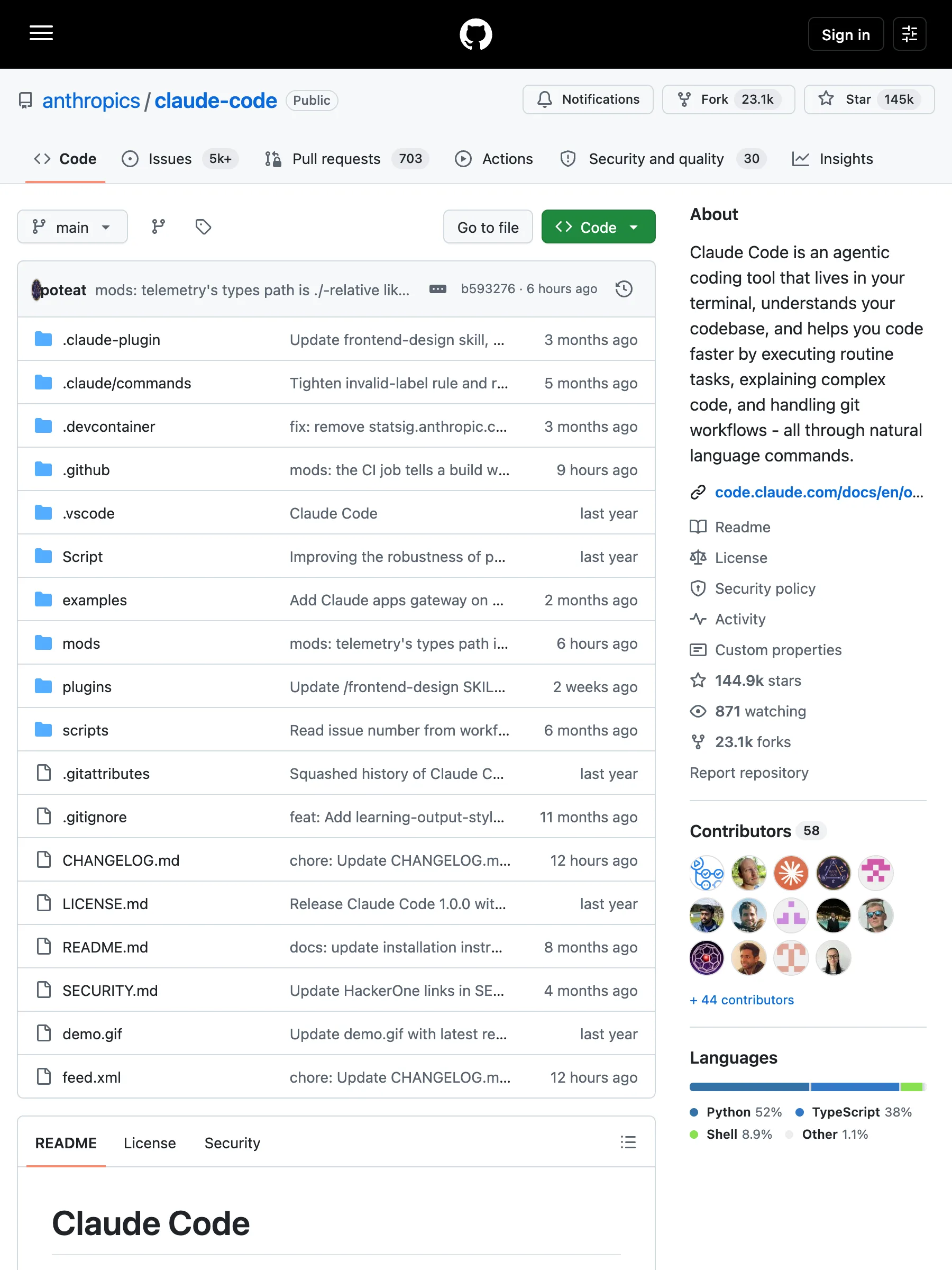
335 KB of HTML — file tree, sidebar modules, nav chrome
What the API returns
markdown# Claude Code[![npm]](https://www.npmjs.com/package/@anthropic-ai/claude-code)[npm]: https://img.shields.io/npm/v/@anthropic-ai/claude-code.svg?style=flat-squareClaude Code is an agentic coding tool that lives in your terminal, understands your codebase, and helps you code faster by executing routine tasks, explaining complex code, and handling git workflows -- all through natural language commands. Use it in your terminal, IDE, or tag @claude on Github.**Learn more in the [official documentation](https://code.claude.com/docs/en/overview)**.<img src="./demo.gif" />## Get started> [!NOTE]> Installation via npm is deprecated. Use one of the recommended methods below.For more installation options, uninstall steps, and troubleshooting, see the [setup documentation](https://code.claude.com/docs/en/setup).1. Install Claude Code:**MacOS/Linux (Recommended):**```bashcurl -fsSL https://claude.ai/install.sh | bash```**Homebrew (MacOS/Linux):**```bashbrew install --cask claude-code```**Windows (Recommended):**```powershellirm https://claude.ai/install.ps1 | iex```**WinGet (Windows):**```powershellwinget install Anthropic.ClaudeCode```**NPM (Deprecated):**```bashnpm install -g @anthropic-ai/claude-code```2. Navigate to your project directory and run `claude`.## PluginsThis repository includes several Claude Code plugins that extend functionality with custom commands and agents. See the [plugins directory](./plugins/README.md) for detailed documentation on available plugins.## Reporting BugsWe welcome your feedback. Use the `/bug` command to report issues directly within Claude Code, or file a [GitHub issue](https://github.com/anthropics/claude-code/issues).## Connect on DiscordJoin the [Claude Developers Discord](https://anthropic.com/discord) to connect with other developers using Claude Code. Get help, share feedback, and discuss your projects with the community.## Data collection, usage, and retentionWhen you use Claude Code, we collect feedback, which includes usage data (such as code acceptance or rejections), associated conversation data, and user feedback submitted via the `/bug` command.### How we use your dataSee our [data usage policies](https://code.claude.com/docs/en/data-usage).### Privacy safeguardsWe have implemented several safeguards to protect your data, including limited retention periods for sensitive information, restricted access to user session data, and clear policies against using feedback for model training.For full details, please review our [Commercial Terms of Service](https://www.anthropic.com/legal/commercial-terms) and [Privacy Policy](https://www.anthropic.com/legal/privacy).
The README as Markdown — 2.8 KB, ready to index
github.com/facebook/react/blob/main/package.jsonWhat GitHub serves
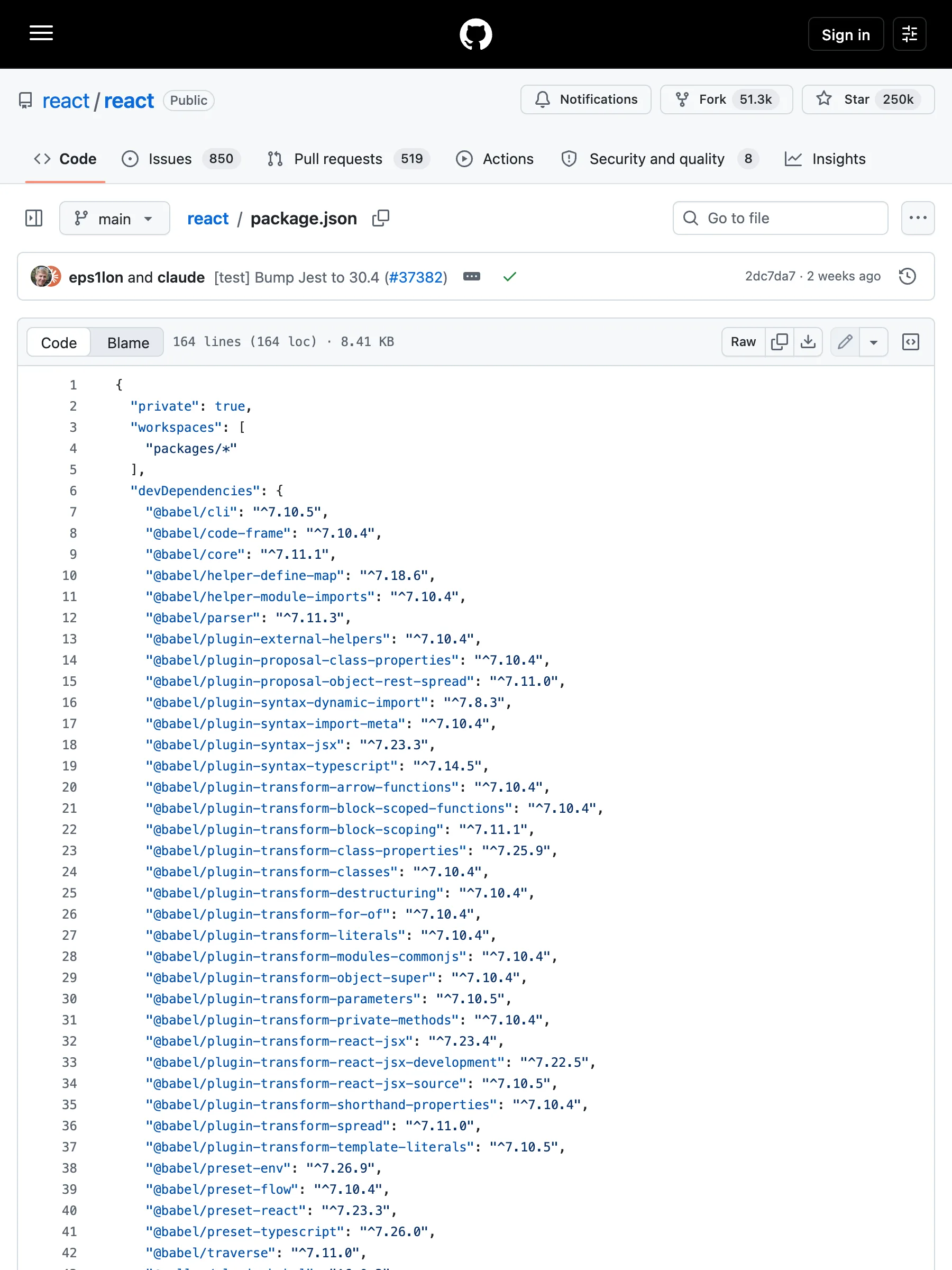
351 KB of HTML — line numbers, blame bar, edit buttons
What the API returns
markdown# package.json```json{"private": true,"workspaces": ["packages/*"],"devDependencies": {"@babel/cli": "^7.10.5","@babel/code-frame": "^7.10.4","@babel/core": "^7.11.1","@babel/helper-define-map": "^7.18.6","@babel/helper-module-imports": "^7.10.4","@babel/parser": "^7.11.3","@babel/plugin-external-helpers": "^7.10.4","@babel/plugin-proposal-class-properties": "^7.10.4","@babel/plugin-proposal-object-rest-spread": "^7.11.0","@babel/plugin-syntax-dynamic-import": "^7.8.3","@babel/plugin-syntax-import-meta": "^7.10.4","@babel/plugin-syntax-jsx": "^7.23.3","@babel/plugin-syntax-typescript": "^7.14.5","@babel/plugin-transform-arrow-functions": "^7.10.4","@babel/plugin-transform-block-scoped-functions": "^7.10.4","@babel/plugin-transform-block-scoping": "^7.11.1","@babel/plugin-transform-class-properties": "^7.25.9","@babel/plugin-transform-classes": "^7.10.4","@babel/plugin-transform-destructuring": "^7.10.4","@babel/plugin-transform-for-of": "^7.10.4","@babel/plugin-transform-literals": "^7.10.4","@babel/plugin-transform-modules-commonjs": "^7.10.4","@babel/plugin-transform-object-super": "^7.10.4","@babel/plugin-transform-parameters": "^7.10.5","@babel/plugin-transform-private-methods": "^7.10.4","@babel/plugin-transform-react-jsx": "^7.23.4","@babel/plugin-transform-react-jsx-development": "^7.22.5","@babel/plugin-transform-react-jsx-source": "^7.10.5","@babel/plugin-transform-shorthand-properties": "^7.10.4","@babel/plugin-transform-spread": "^7.11.0","@babel/plugin-transform-template-literals": "^7.10.5","@babel/preset-env": "^7.26.9","@babel/preset-flow": "^7.10.4","@babel/preset-react": "^7.23.3","@babel/preset-typescript": "^7.26.0","@babel/traverse": "^7.11.0","@rollup/plugin-babel": "^6.0.3","@rollup/plugin-commonjs": "^24.0.1","@rollup/plugin-node-resolve": "^15.0.1","@rollup/plugin-replace": "^5.0.2","@rollup/plugin-typescript": "^12.1.2","@types/invariant": "^2.2.35","@typescript-eslint/eslint-plugin": "^6.21.0","@typescript-eslint/parser": "^6.21.0","abortcontroller-polyfill": "^1.7.5","art": "0.10.1","babel-jest": "^30.4.1","babel-plugin-syntax-hermes-parser": "^0.36.1","babel-plugin-syntax-trailing-function-commas": "^6.5.0","busboy": "^1.6.0","chalk": "^3.0.0","cli-table": "^0.3.1","coffee-script": "^1.12.7","confusing-browser-globals": "^1.0.9","core-js": "^3.6.4","create-react-class": "^15.6.3","error-stack-parser": "^2.0.6","eslint": "^7.7.0","eslint-config-prettier": "^6.9.0","eslint-plugin-babel": "^5.3.0","eslint-plugin-es": "^4.1.0","eslint-plugin-eslint-plugin": "^3.5.3","eslint-plugin-ft-flow": "^2.0.3","eslint-plugin-jest": "28.4.0","eslint-plugin-no-for-of-loops": "^1.0.0","eslint-plugin-no-function-declare-after-return": "^1.0.0","eslint-plugin-react": "^6.7.1","eslint-plugin-react-hooks-published": "npm:eslint-plugin-react-hooks@^5.2.0","eslint-plugin-react-internal": "link:./scripts/eslint-rules","fbjs-scripts": "^3.0.1","filesize": "^6.0.1","flow-bin": "^0.317.0","flow-remove-types": "^2.317.0","flow-typed": "^4.1.1","glob": "^7.1.6","glob-stream": "^6.1.0","google-closure-compiler": "^20230206.0.0","gzip-size": "^5.1.1","hermes-eslint": "^0.36.1","hermes-parser": "^0.36.1","jest": "^30.4.1","jest-cli": "^30.4.1","jest-diff": "^30.4.1","jest-environment-jsdom": "^30.4.1","jest-silent-reporter": "^0.6.0","jest-snapshot-serializer-raw": "^1.2.0","minimatch": "^3.0.4","minimist": "^1.2.3","mkdirp": "^0.5.1","ncp": "^2.0.0","prettier": "^3.3.3","prettier-plugin-hermes-parser": "^0.36.1","pretty-format": "^30.4.1","prop-types": "^15.6.2","random-seed": "^0.3.0","react-lifecycles-compat": "^3.0.4","rimraf": "^3.0.0","rollup": "^3.29.5","rollup-plugin-dts": "^6.1.1","rollup-plugin-prettier": "^4.1.1","rollup-plugin-strip-banner": "^3.0.0","semver": "^7.1.1","shelljs": "^0.8.5","signedsource": "^2.0.0","targz": "^1.0.1","through2": "^3.0.1","tmp": "^0.1.0","to-fast-properties": "^2.0.0","tsup": "^8.4.0","typescript": "^5.4.3","undici": "^5.28.4","web-streams-polyfill": "^3.1.1","yargs": "^15.3.1"},"jest": {"testRegex": "/scripts/jest/dont-run-jest-directly\\.js$"},"scripts": {"prebuild": "./scripts/react-compiler/link-compiler.sh","build": "node ./scripts/rollup/build-all-release-channels.js","build-for-devtools": "cross-env yarn build react/index,react/jsx,react/compiler-runtime,react-dom/index,react-dom/client,react-dom/unstable_testing,react-dom/test-utils,react-is,react-debug-tools,scheduler,react-test-renderer,react-refresh,react-art --type=NODE --release-channel=experimental","build-for-devtools-dev": "yarn build-for-devtools --type=NODE_DEV","build-for-devtools-prod": "yarn build-for-devtools --type=NODE_PROD","build-for-flight-dev": "cross-env RELEASE_CHANNEL=experimental node ./scripts/rollup/build.js react/index,react/jsx,react.react-server,react-dom/index,react-dom/client,react-dom/server,react-dom.react-server,react-dom-server.node,react-dom-server-legacy.node,scheduler,react-server-dom-webpack/,react-server-dom-unbundled/ --type=NODE_DEV,ESM_PROD,NODE_ES2015 && mv ./build/node_modules ./build/oss-experimental","build-for-flight-prod": "cross-env RELEASE_CHANNEL=experimental node ./scripts/rollup/build.js react/index,react/jsx,react.react-server,react-dom/index,react-dom/client,react-dom/server,react-dom.react-server,react-dom-server.node,react-dom-server-legacy.node,scheduler,react-server-dom-webpack/,react-server-dom-unbundled/ --type=NODE_PROD,ESM_PROD,NODE_ES2015 && mv ./build/node_modules ./build/oss-experimental","build-for-vt-dev": "cross-env RELEASE_CHANNEL=experimental node ./scripts/rollup/build.js react/index,react/jsx,react-dom/index,react-dom/client,react-dom/server,react-dom-server.node,react-dom-server-legacy.node,scheduler --type=NODE_DEV && mv ./build/node_modules ./build/oss-experimental","flow-typed-install": "yarn flow-typed install --skip --skipFlowRestart --ignore-deps=dev","linc": "node ./scripts/tasks/linc.js","lint": "node ./scripts/tasks/eslint.js","lint-build": "node ./scripts/rollup/validate/index.js","extract-errors": "node scripts/error-codes/extract-errors.js","postinstall": "node ./scripts/flow/createFlowConfigs.js","test": "node ./scripts/jest/jest-cli.js","test-stable": "node ./scripts/jest/jest-cli.js --release-channel=stable","test-www": "node ./scripts/jest/jest-cli.js --release-channel=www-modern","test-classic": "node ./scripts/jest/jest-cli.js --release-channel=www-classic","test-build-devtools": "node ./scripts/jest/jest-cli.js --build --project devtools --release-channel=experimental","test-dom-fixture": "cd fixtures/dom && yarn && yarn test","flow": "node ./scripts/tasks/flow.js","flow-ci": "node ./scripts/tasks/flow-ci.js","prettier": "node ./scripts/prettier/index.js write-changed","prettier-all": "node ./scripts/prettier/index.js write","prettier-check": "node ./scripts/prettier/index.js","version-check": "node ./scripts/tasks/version-check.js","publish-prereleases": "echo 'This command has been deprecated. Please refer to https://github.com/facebook/react/tree/main/scripts/release#trigger-an-automated-prerelease'","download-build": "node ./scripts/release/download-experimental-build.js","download-build-for-head": "node ./scripts/release/download-experimental-build.js --commit=$(git rev-parse HEAD)","download-build-in-codesandbox-ci": "yarn build --type=node react/index react.react-server react-dom/index react-dom/client react-dom/src/server react-dom/test-utils react-dom.react-server scheduler/index react/jsx-runtime react/jsx-dev-runtime react-server-dom-webpack","check-release-dependencies": "node ./scripts/release/check-release-dependencies","generate-inline-fizz-runtime": "node ./scripts/rollup/generate-inline-fizz-runtime.js","generate-changelog": "node ./scripts/tasks/generate-changelog/index.js","flags": "node ./scripts/flags/flags.js"},"resolutions": {"react-is": "npm:react-is"},"packageManager": "yarn@1.22.22"}```
The file in a fenced code block — 8.6 KB of source
raw.githubusercontent.com/anthropics/claude-code/main/README.mdWhat GitHub serves
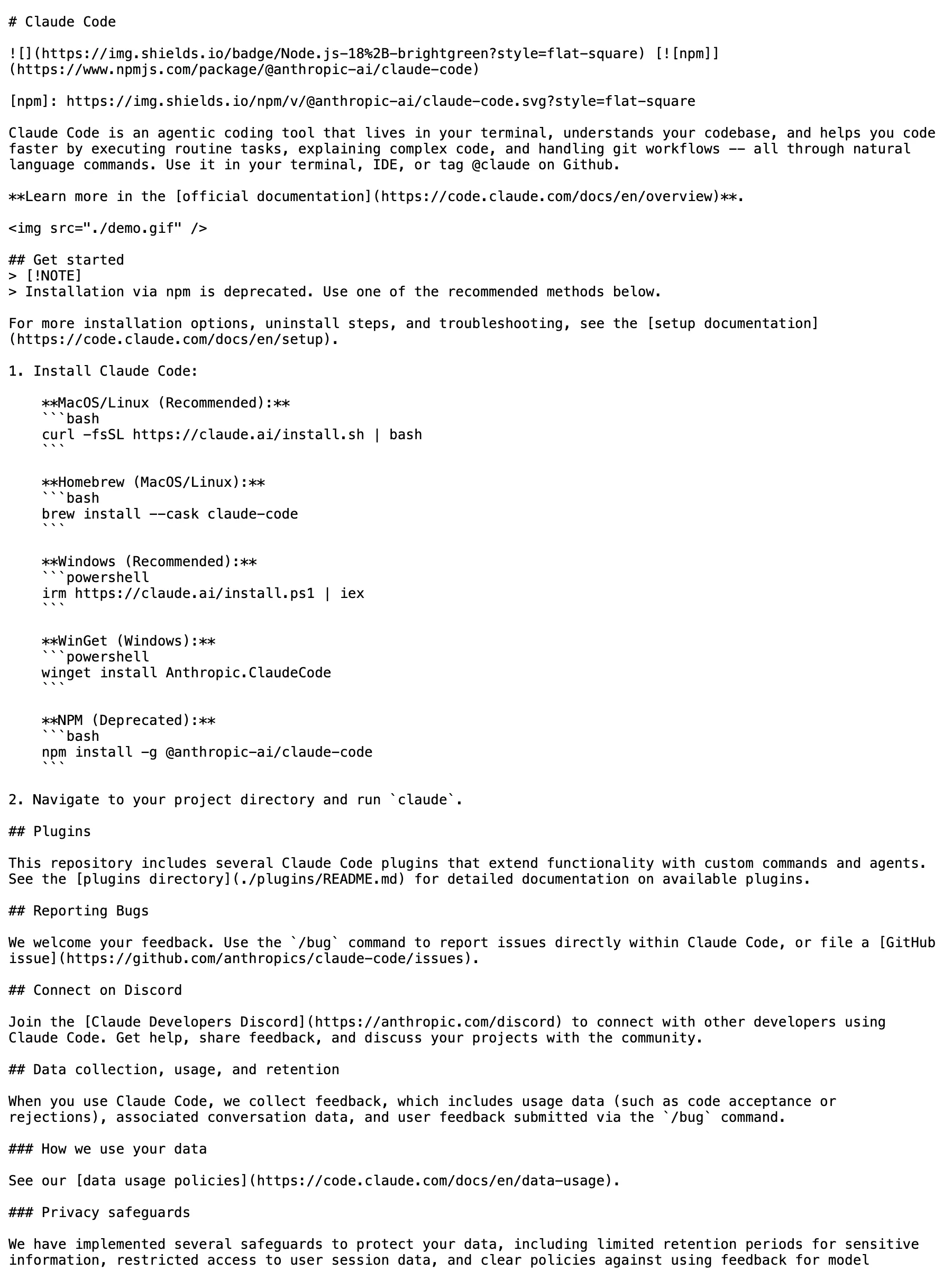
3 KB — the raw file, already plain text
What the API returns
markdown# Claude Code[![npm]](https://www.npmjs.com/package/@anthropic-ai/claude-code)[npm]: https://img.shields.io/npm/v/@anthropic-ai/claude-code.svg?style=flat-squareClaude Code is an agentic coding tool that lives in your terminal, understands your codebase, and helps you code faster by executing routine tasks, explaining complex code, and handling git workflows -- all through natural language commands. Use it in your terminal, IDE, or tag @claude on Github.**Learn more in the [official documentation](https://code.claude.com/docs/en/overview)**.<img src="./demo.gif" />## Get started> [!NOTE]> Installation via npm is deprecated. Use one of the recommended methods below.For more installation options, uninstall steps, and troubleshooting, see the [setup documentation](https://code.claude.com/docs/en/setup).1. Install Claude Code:**MacOS/Linux (Recommended):**```bashcurl -fsSL https://claude.ai/install.sh | bash```**Homebrew (MacOS/Linux):**```bashbrew install --cask claude-code```**Windows (Recommended):**```powershellirm https://claude.ai/install.ps1 | iex```**WinGet (Windows):**```powershellwinget install Anthropic.ClaudeCode```**NPM (Deprecated):**```bashnpm install -g @anthropic-ai/claude-code```2. Navigate to your project directory and run `claude`.## PluginsThis repository includes several Claude Code plugins that extend functionality with custom commands and agents. See the [plugins directory](./plugins/README.md) for detailed documentation on available plugins.## Reporting BugsWe welcome your feedback. Use the `/bug` command to report issues directly within Claude Code, or file a [GitHub issue](https://github.com/anthropics/claude-code/issues).## Connect on DiscordJoin the [Claude Developers Discord](https://anthropic.com/discord) to connect with other developers using Claude Code. Get help, share feedback, and discuss your projects with the community.## Data collection, usage, and retentionWhen you use Claude Code, we collect feedback, which includes usage data (such as code acceptance or rejections), associated conversation data, and user feedback submitted via the `/bug` command.### How we use your dataSee our [data usage policies](https://code.claude.com/docs/en/data-usage).### Privacy safeguardsWe have implemented several safeguards to protect your data, including limited retention periods for sensitive information, restricted access to user session data, and clear policies against using feedback for model training.For full details, please review our [Commercial Terms of Service](https://www.anthropic.com/legal/commercial-terms) and [Privacy Policy](https://www.anthropic.com/legal/privacy).
Verbatim — 2.8 KB, byte-identical Markdown
What is covered, by URL pattern
GitHub support is measured per URL pattern, not claimed per domain. Every row below is verified against the live crawler.
| URL pattern | Status | What you get |
|---|---|---|
/<owner>/<repo> | Supported | The repository’s README as clean Markdown — the document, not the page chrome. |
/<owner>/<repo>/blob/<ref>/<path> | Supported | The file body in a fenced code block — real source text, not rendered HTML. |
raw.githubusercontent.com/* · gist raw | Supported | Raw file content returned verbatim — already text, stays text. |
GitHub content without the page chrome
Point the Crawl endpoint at a GitHub URL and the request is routed to a converter that knows what the page is for. A repo page returns its README; a file view returns the file; a raw URL returns bytes as served. The nav, file tree, and sidebar chrome never reach your pipeline.
The artifact, not the page
Repo pages exist to show files — the converter returns the README a visitor actually reads, minus the chrome around it.
Source stays source
Blob views come back as fenced code blocks and raw URLs come back verbatim — indentation and formatting survive the round trip.
Honest boundaries
Issues, PRs, and profile pages are not claimed — where the dedicated path has no clean answer, the matrix simply does not list the pattern.
Verified per URL pattern
Every row in the matrix is reproduced from a live crawl of a real URL — support is measured per pattern, not claimed per domain.
What is a GitHub scraper API?
A GitHub scraper API is an HTTP interface that takes a GitHub URL and returns the page’s real content in a structured, model-ready format. GitHub’s pages are heavy — a repo view is a file tree, a sidebar, and a nav stack around one README. Search1API’s Crawl endpoint uses a converter that maps each URL shape to its artifact: README for repos, fenced source for file views, verbatim text for raw files. The result is content you can index or feed to a model directly, without writing per-site cleanup rules.
Typical workflow
Send a public GitHub URL to the Crawl endpoint and get back clean Markdown — repo pages return the README, file views return fenced source, raw URLs return the file as-is. No GitHub account needed.
POST a GitHub URL to the Crawl endpoint — no GitHub account needed.
The URL is matched against the pattern rules and routed to the GitHub converter.
Repo pages return README Markdown; blob views return fenced source; raw URLs return the file verbatim.
Patterns without a clean answer are not claimed — the matrix is the boundary, verified on live requests.
Where teams use it
Ingest READMEs across a dependency tree or an org’s public repos for docs search.
Pull source files into code-aware pipelines as fenced, syntax-marked blocks.
Track upstream projects — a repo URL returns the current README on every call.
Feed raw config and docs files straight into retrieval without HTML cleanup.
FAQ
Do I need a GitHub account or token?
No — everything here reads public pages an anonymous visitor can open. Private repos and anything behind login are simply out of scope.
Which GitHub URLs are supported?
Repository roots, blob file views, and raw.githubusercontent.com URLs. Issues, pull requests, releases, and profile pages are not part of the verified matrix.
What does a repo page return?
The README as clean Markdown — the artifact a reader came for. The file listing, sidebar, and navigation chrome are stripped by the dedicated converter.
How is this different from the GitHub API?
The REST API needs a token for useful rate limits and returns JSON you still have to render or fetch file-by-file. This path takes the URL you already have and returns the readable artifact in one call — Markdown in, Markdown out.
Does it handle monorepos and large files?
Blob views return the file body regardless of repo layout. Very large files follow the same content-size limits as every other Crawl response.
Is scraping GitHub legal?
We only fetch content GitHub serves to anonymous visitors — no login, no session sharing, no circumvention of access controls. Whether a specific use complies with applicable law and GitHub’s terms depends on your jurisdiction and use case, so confirm that with your own counsel.