npm package pages to Markdown

npm scraper API for package pages

Send an npm package URL to the Crawl endpoint and get back structured Markdown — the README plus version, license, weekly downloads, and the full dependency list. Scoped and version-pinned URLs included.

Endpointbash
POST https://api.search1api.com/crawl
{ "url": "https://www.npmjs.com/package/express" }
What you can crawl

npmjs.com sits behind Cloudflare — so the adapter reads registry.npmjs.org, the public API the npm CLI itself uses.

1
Package pages

The README as Markdown — plus version, license, weekly downloads, and dependency count in metadata.

2
Scoped packages

@org/name URLs resolve the same way — scope preserved in the package field.

3
Pinned versions

/v/<version> URLs return that exact release — its README, its dependency spec, its metadata.

Useful for

Dependency research / Package discovery / Supply-chain review

What goes in, what comes back

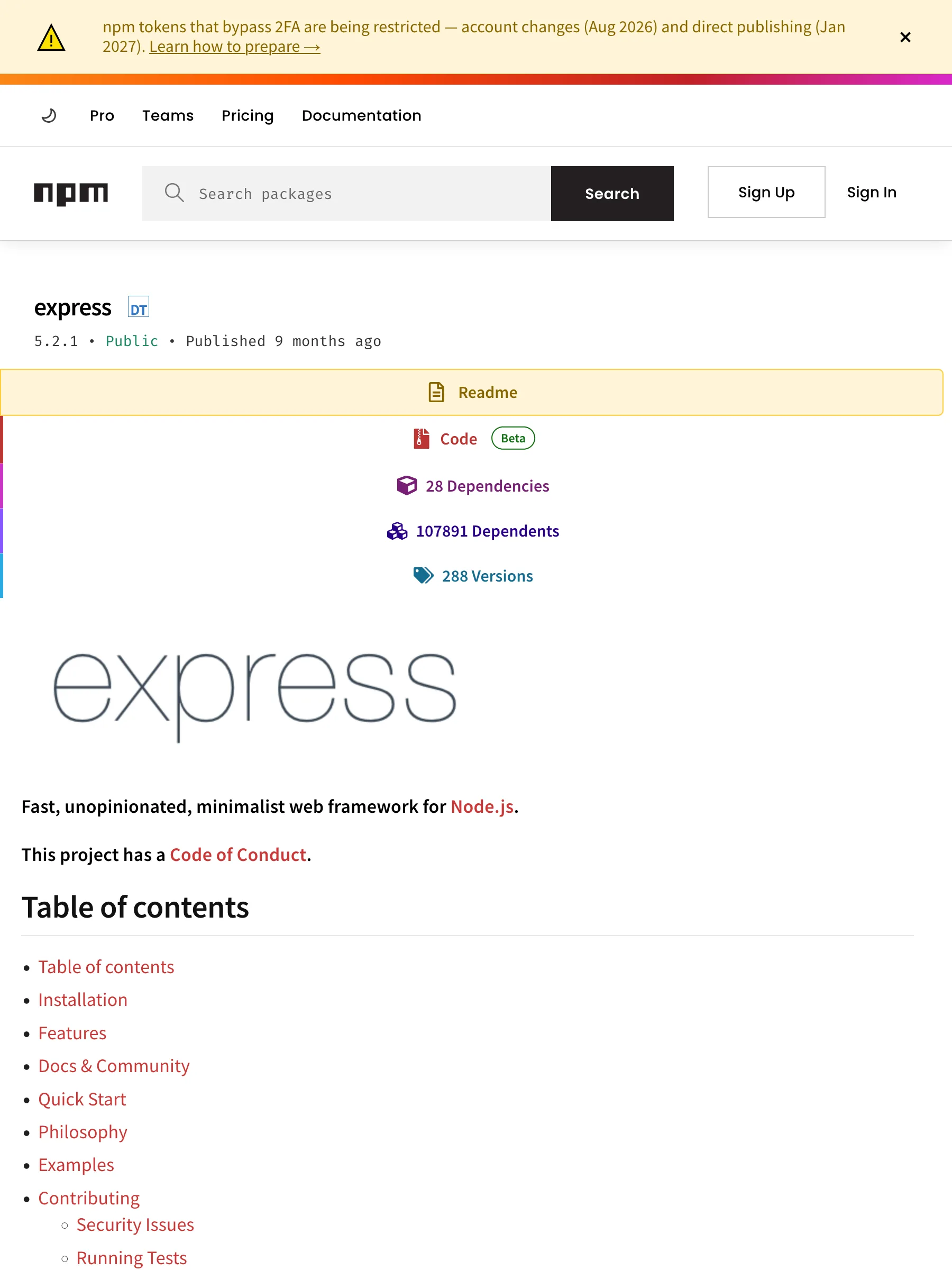
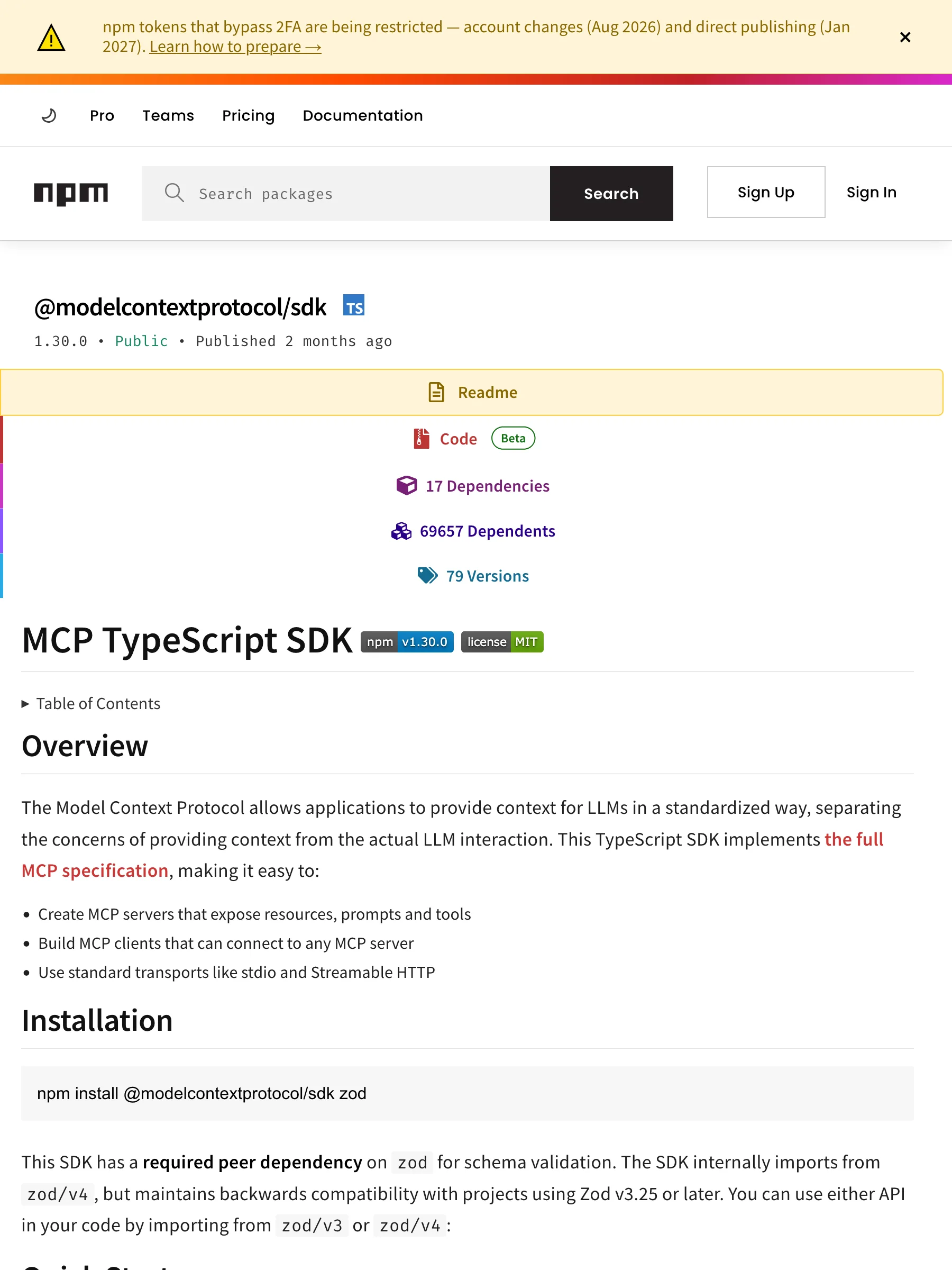
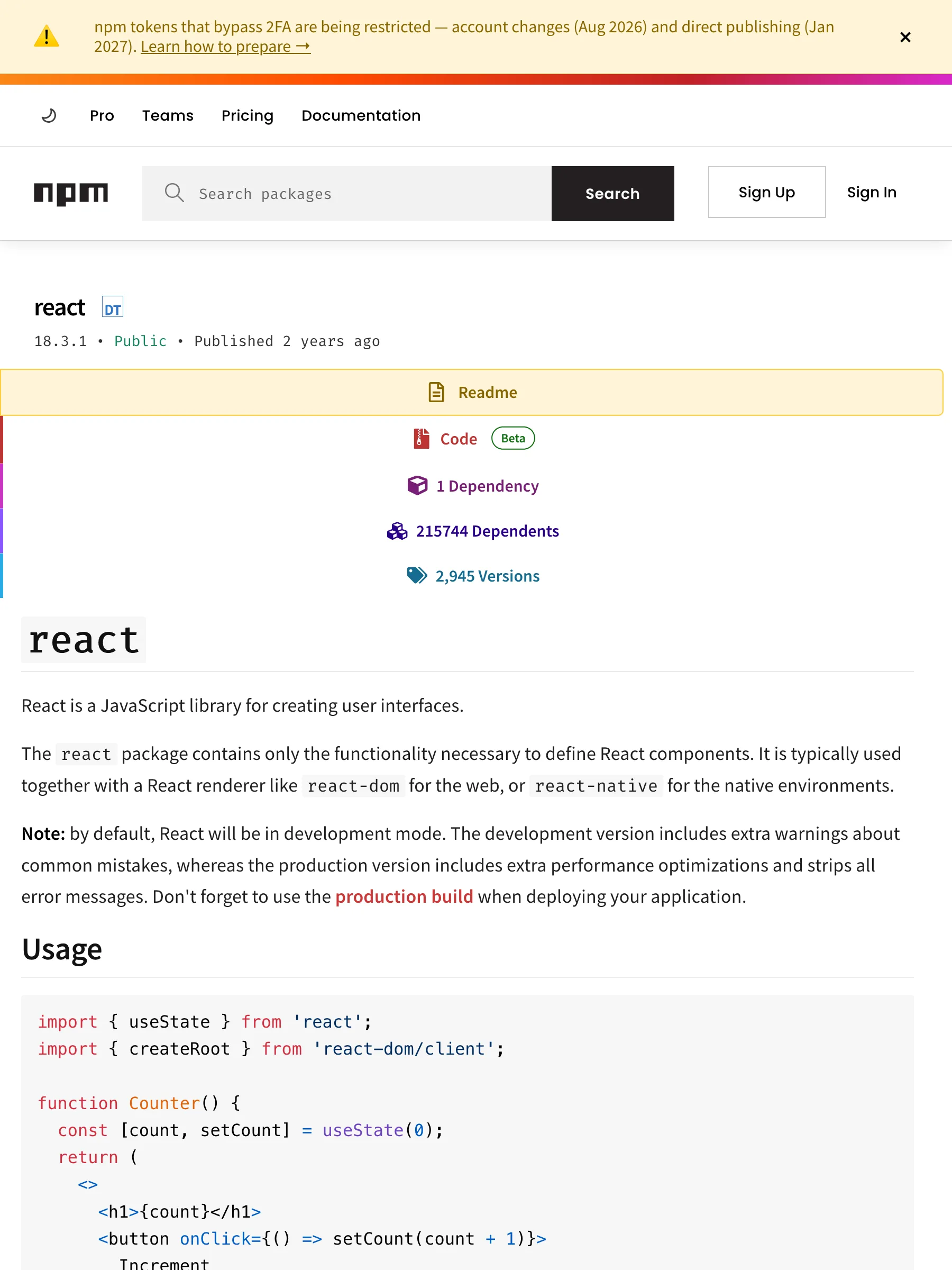
Three URL types. Left: the public page as npm actually serves it — a real capture through a fingerprint-patched browser, since npmjs.com challenges plain fetches. Right: the complete results.content the API returns, byte for byte.

Package pagenpmjs.com/package/express

What npm serves

The express package page on npmjs.com with readme, dependencies, and versions tabs

142 KB rendered HTML — readme tabs, dependency counts, version history

What the API returns

markdown
# express@5.2.1
Fast, unopinionated, minimalist web framework
License: MIT · Weekly downloads: 97,784,379 · Homepage: https://expressjs.com/ · Repository: https://github.com/expressjs/express · Author: TJ Holowaychuk
```
npm install express
```
## Dependencies (28)
- qs@^6.14.0
- depd@^2.0.0
- etag@^1.8.1
- once@^1.4.0
- send@^1.1.0
- vary@^1.1.2
- debug@^4.4.0
- fresh@^2.0.0
- cookie@^0.7.1
- router@^2.2.0
- accepts@^2.0.0
- type-is@^2.0.1
- parseurl@^1.3.3
- statuses@^2.0.1
- encodeurl@^2.0.0
- mime-types@^3.0.0
- proxy-addr@^2.0.7
- body-parser@^2.2.1
- escape-html@^1.0.3
- http-errors@^2.0.0
- on-finished@^2.4.1
- content-type@^1.0.5
- finalhandler@^2.1.0
- range-parser@^1.2.1
- serve-static@^2.2.0
- cookie-signature@^1.2.1
- merge-descriptors@^2.0.0
- content-disposition@^1.0.0
## README
**Fast, unopinionated, minimalist web framework for [Node.js](https://nodejs.org).**
**This project has a [Code of Conduct].**
## Table of contents
- Table of contents
- Installation
- Features
- Docs \& Community
- Quick Start
- Philosophy
- Examples
- Contributing
- Security Issues
- Running Tests
- Current project team members
- TC (Technical Committee)
- TC emeriti members
- Triagers
- Emeritus Triagers
- License
[![NPM Version][npm-version-image]][npm-url]
[![NPM Downloads][npm-downloads-image]][npm-downloads-url]
[![Linux Build][github-actions-ci-image]][github-actions-ci-url]
[![Test Coverage][coveralls-image]][coveralls-url]
[![OpenSSF Scorecard Badge][ossf-scorecard-badge]][ossf-scorecard-visualizer]
```js
import express from 'express'
const app = express()
app.get('/', (req, res) => {
res.send('Hello World')
})
app.listen(3000, () => {
console.log('Server is running on http://localhost:3000')
})
```
## Installation
This is a [Node.js](https://nodejs.org/en/) module available through the
[npm registry](https://www.npmjs.com/).
Before installing, [download and install Node.js](https://nodejs.org/en/download/).
Node.js 18 or higher is required.
If this is a brand new project, make sure to create a `package.json` first with
the [`npm init` command](https://docs.npmjs.com/creating-a-package-json-file).
Installation is done using the
[`npm install` command](https://docs.npmjs.com/getting-started/installing-npm-packages-locally):
```bash
npm install express
```
Follow [our installing guide](https://expressjs.com/en/starter/installing.html)
for more information.
## Features
* Robust routing
* Focus on high performance
* Super-high test coverage
* HTTP helpers (redirection, caching, etc)
* View system supporting 14+ template engines
* Content negotiation
* Executable for generating applications quickly
## Docs & Community
* [Website and Documentation](https://expressjs.com/) - [[website repo](https://github.com/expressjs/expressjs.com)]
* [GitHub Organization](https://github.com/expressjs) for Official Middleware & Modules
* [Github Discussions](https://github.com/expressjs/discussions) for discussion on the development and usage of Express
**PROTIP** Be sure to read the [migration guide to v5](https://expressjs.com/en/guide/migrating-5)
## Quick Start
The quickest way to get started with express is to utilize the executable [`express(1)`](https://github.com/expressjs/generator) to generate an application as shown below:
Install the executable. The executable's major version will match Express's:
```bash
npm install -g express-generator@4
```
Create the app:
```bash
express /tmp/foo && cd /tmp/foo
```
Install dependencies:
```bash
npm install
```
Start the server:
```bash
npm start
```
View the website at: http://localhost:3000
## Philosophy
The Express philosophy is to provide small, robust tooling for HTTP servers, making
it a great solution for single page applications, websites, hybrids, or public
HTTP APIs.
Express does not force you to use any specific ORM or template engine. With support for over
14 template engines via [@ladjs/consolidate](https://github.com/ladjs/consolidate),
you can quickly craft your perfect framework.
## Examples
To view the examples, clone the Express repository:
```bash
git clone https://github.com/expressjs/express.git --depth 1 && cd express
```
Then install the dependencies:
```bash
npm install
```
Then run whichever example you want:
```bash
node examples/content-negotiation
```
## Contributing
The Express.js project welcomes all constructive contributions. Contributions take many forms,
from code for bug fixes and enhancements, to additions and fixes to documentation, additional
tests, triaging incoming pull requests and issues, and more!
See the [Contributing Guide] for more technical details on contributing.
### Security Issues
If you discover a security vulnerability in Express, please see [Security Policies and Procedures](SECURITY.md).
### Running Tests
To run the test suite, first install the dependencies:
```bash
npm install
```
Then run `npm test`:
```bash
npm test
```
## Current project team members
For information about the governance of the express.js project, see [GOVERNANCE.md](https://github.com/expressjs/discussions/blob/HEAD/docs/GOVERNANCE.md).
The original author of Express is [TJ Holowaychuk](https://github.com/tj)
[List of all contributors](https://github.com/expressjs/express/graphs/contributors)
### TC (Technical Committee)
* [UlisesGascon](https://github.com/UlisesGascon) - **Ulises Gascón** (he/him)
* [jonchurch](https://github.com/jonchurch) - **Jon Church**
* [wesleytodd](https://github.com/wesleytodd) - **Wes Todd**
* [LinusU](https://github.com/LinusU) - **Linus Unnebäck**
* [blakeembrey](https://github.com/blakeembrey) - **Blake Embrey**
* [sheplu](https://github.com/sheplu) - **Jean Burellier**
* [crandmck](https://github.com/crandmck) - **Rand McKinney**
* [ctcpip](https://github.com/ctcpip) - **Chris de Almeida**
<details>
<summary>TC emeriti members</summary>
#### TC emeriti members
* [dougwilson](https://github.com/dougwilson) - **Douglas Wilson**
* [hacksparrow](https://github.com/hacksparrow) - **Hage Yaapa**
* [jonathanong](https://github.com/jonathanong) - **jongleberry**
* [niftylettuce](https://github.com/niftylettuce) - **niftylettuce**
* [troygoode](https://github.com/troygoode) - **Troy Goode**
</details>
### Triagers
* [aravindvnair99](https://github.com/aravindvnair99) - **Aravind Nair**
* [bjohansebas](https://github.com/bjohansebas) - **Sebastian Beltran**
* [carpasse](https://github.com/carpasse) - **Carlos Serrano**
* [CBID2](https://github.com/CBID2) - **Christine Belzie**
* [UlisesGascon](https://github.com/UlisesGascon) - **Ulises Gascón** (he/him)
* [IamLizu](https://github.com/IamLizu) - **S M Mahmudul Hasan** (he/him)
* [Phillip9587](https://github.com/Phillip9587) - **Phillip Barta**
* [efekrskl](https://github.com/efekrskl) - **Efe Karasakal**
<details>
<summary>Triagers emeriti members</summary>
#### Emeritus Triagers
* [AuggieH](https://github.com/AuggieH) - **Auggie Hudak**
* [G-Rath](https://github.com/G-Rath) - **Gareth Jones**
* [MohammadXroid](https://github.com/MohammadXroid) - **Mohammad Ayashi**
* [NawafSwe](https://github.com/NawafSwe) - **Nawaf Alsharqi**
* [NotMoni](https://github.com/NotMoni) - **Moni**
* [VigneshMurugan](https://github.com/VigneshMurugan) - **Vignesh Murugan**
* [davidmashe](https://github.com/davidmashe) - **David Ashe**
* [digitaIfabric](https://github.com/digitaIfabric) - **David**
* [e-l-i-s-e](https://github.com/e-l-i-s-e) - **Elise Bonner**
* [fed135](https://github.com/fed135) - **Frederic Charette**
* [firmanJS](https://github.com/firmanJS) - **Firman Abdul Hakim**
* [getspooky](https://github.com/getspooky) - **Yasser Ameur**
* [ghinks](https://github.com/ghinks) - **Glenn**
* [ghousemohamed](https://github.com/ghousemohamed) - **Ghouse Mohamed**
* [gireeshpunathil](https://github.com/gireeshpunathil) - **Gireesh Punathil**
* [jake32321](https://github.com/jake32321) - **Jake Reed**
* [jonchurch](https://github.com/jonchurch) - **Jon Church**
* [lekanikotun](https://github.com/lekanikotun) - **Troy Goode**
* [marsonya](https://github.com/marsonya) - **Lekan Ikotun**
* [mastermatt](https://github.com/mastermatt) - **Matt R. Wilson**
* [maxakuru](https://github.com/maxakuru) - **Max Edell**
* [mlrawlings](https://github.com/mlrawlings) - **Michael Rawlings**
* [rodion-arr](https://github.com/rodion-arr) - **Rodion Abdurakhimov**
* [sheplu](https://github.com/sheplu) - **Jean Burellier**
* [tarunyadav1](https://github.com/tarunyadav1) - **Tarun yadav**
* [tunniclm](https://github.com/tunniclm) - **Mike Tunnicliffe**
* [enyoghasim](https://github.com/enyoghasim) - **David Enyoghasim**
* [0ss](https://github.com/0ss) - **Salah**
* [import-brain](https://github.com/import-brain) - **Eric Cheng** (he/him)
* [dakshkhetan](https://github.com/dakshkhetan) - **Daksh Khetan** (he/him)
* [lucasraziel](https://github.com/lucasraziel) - **Lucas Soares Do Rego**
* [mertcanaltin](https://github.com/mertcanaltin) - **Mert Can Altin**
* [dpopp07](https://github.com/dpopp07) - **Dustin Popp**
* [Sushmeet](https://github.com/Sushmeet) - **Sushmeet Sunger**
* [3imed-jaberi](https://github.com/3imed-jaberi) - **Imed Jaberi**
</details>
## License
[MIT](LICENSE)
[coveralls-image]: https://img.shields.io/coverallsCoverage/github/expressjs/express?branch=master
[coveralls-url]: https://coveralls.io/r/expressjs/express?branch=master
[github-actions-ci-image]: https://img.shields.io/github/actions/workflow/status/expressjs/express/ci.yml?branch=master&label=ci
[github-actions-ci-url]: https://github.com/expressjs/express/actions/workflows/ci.yml
[npm-downloads-image]: https://img.shields.io/npm/dm/express
[npm-downloads-url]: https://npmcharts.com/compare/express?minimal=true
[npm-url]: https://npmjs.org/package/express
[npm-version-image]: https://img.shields.io/npm/v/express
[ossf-scorecard-badge]: https://api.scorecard.dev/projects/github.com/expressjs/express/badge
[ossf-scorecard-visualizer]: https://ossf.github.io/scorecard-visualizer/#/projects/github.com/expressjs/express
[Code of Conduct]: https://github.com/expressjs/.github/blob/HEAD/CODE_OF_CONDUCT.md
[Contributing Guide]: https://github.com/expressjs/.github/blob/HEAD/CONTRIBUTING.md

Package card + README — 10 KB · express@5.2.1 · 97.8M weekly downloads · 28 dependencies

Scoped packagenpmjs.com/package/@modelcontextprotocol/sdk

What npm serves

The @modelcontextprotocol/sdk scoped package page on npmjs.com

122 KB rendered HTML — same layout, scope in the package name

What the API returns

markdown
# @modelcontextprotocol/sdk@1.30.0
Model Context Protocol implementation for TypeScript
License: MIT · Weekly downloads: 41,124,660 · Homepage: https://modelcontextprotocol.io · Repository: https://github.com/modelcontextprotocol/typescript-sdk · Author: Anthropic, PBC
```
npm install @modelcontextprotocol/sdk
```
## Dependencies (17)
- ajv@^8.17.1
- zod@^3.25 || ^4.0
- cors@^2.8.5
- hono@^4.11.4
- jose@^6.1.3
- express@^5.2.1
- raw-body@^3.0.0
- ajv-formats@^3.0.1
- cross-spawn@^7.0.5
- eventsource@^3.0.2
- content-type@^1.0.5
- pkce-challenge@^5.0.0
- @hono/node-server@^1.19.9 || ^2.0.5
- json-schema-typed@^8.0.2
- eventsource-parser@^3.0.0
- express-rate-limit@^8.2.1
- zod-to-json-schema@^3.25.1
## README
# MCP TypeScript SDK
<details>
<summary>Table of Contents</summary>
- Overview
- Installation
- Quick Start
- Core Concepts
- Examples
- Documentation
- Contributing
- License
</details>
## Overview
The Model Context Protocol allows applications to provide context for LLMs in a standardized way, separating the concerns of providing context from the actual LLM interaction. This TypeScript SDK implements
[the full MCP specification](https://modelcontextprotocol.io/specification/draft), making it easy to:
- Create MCP servers that expose resources, prompts and tools
- Build MCP clients that can connect to any MCP server
- Use standard transports like stdio and Streamable HTTP
## Installation
```bash
npm install @modelcontextprotocol/sdk zod
```
This SDK has a **required peer dependency** on `zod` for schema validation. The SDK internally imports from `zod/v4`, but maintains backwards compatibility with projects using Zod v3.25 or later. You can use either API in your code by importing from `zod/v3` or `zod/v4`:
## Quick Start
To see the SDK in action end-to-end, start from the runnable examples in `src/examples`:
1. **Install dependencies** (from the SDK repo root):
```bash
npm install
```
2. **Run the example Streamable HTTP server**:
```bash
npx tsx src/examples/server/simpleStreamableHttp.ts
```
3. **Run the interactive client in another terminal**:
```bash
npx tsx src/examples/client/simpleStreamableHttp.ts
```
This pair of examples demonstrates tools, resources, prompts, sampling, elicitation, tasks and logging. For a guided walkthrough and variations (stateless servers, JSON-only responses, SSE compatibility, OAuth, etc.), see [docs/server.md](docs/server.md) and
[docs/client.md](docs/client.md).
## Core Concepts
### Servers and transports
An MCP server is typically created with `McpServer` and connected to a transport such as Streamable HTTP or stdio. The SDK supports:
- **Streamable HTTP** for remote servers (recommended).
- **HTTP + SSE** for backwards compatibility only.
- **stdio** for local, process-spawned integrations.
Runnable server examples live under `src/examples/server` and are documented in [docs/server.md](docs/server.md).
### Tools, resources, prompts
- **Tools** let LLMs ask your server to take actions (computation, side effects, network calls).
- **Resources** expose read-only data that clients can surface to users or models.
- **Prompts** are reusable templates that help users talk to models in a consistent way.
The detailed APIs, including `ResourceTemplate`, completions, and display-name metadata, are covered in [docs/server.md](docs/server.md#tools-resources-and-prompts), with runnable implementations in [`simpleStreamableHttp.ts`](src/examples/server/simpleStreamableHttp.ts).
### Capabilities: sampling, elicitation, and tasks
The SDK includes higher-level capabilities for richer workflows:
- **Sampling**: server-side tools can ask connected clients to run LLM completions.
- **Form elicitation**: tools can request non-sensitive input via structured forms.
- **URL elicitation**: servers can ask users to complete secure flows in a browser (e.g., API key entry, payments, OAuth).
- **Tasks (experimental)**: long-running tool calls can be turned into tasks that you poll or resume later.
Conceptual overviews and links to runnable examples are in:
- [docs/capabilities.md](docs/capabilities.md)
Key example servers include:
- [`toolWithSampleServer.ts`](src/examples/server/toolWithSampleServer.ts)
- [`elicitationFormExample.ts`](src/examples/server/elicitationFormExample.ts)
- [`elicitationUrlExample.ts`](src/examples/server/elicitationUrlExample.ts)
### Clients
The high-level `Client` class connects to MCP servers over different transports and exposes helpers like `listTools`, `callTool`, `listResources`, `readResource`, `listPrompts`, and `getPrompt`.
Runnable clients live under `src/examples/client` and are described in [docs/client.md](docs/client.md), including:
- Interactive Streamable HTTP client ([`simpleStreamableHttp.ts`](src/examples/client/simpleStreamableHttp.ts))
- Streamable HTTP client with SSE fallback ([`streamableHttpWithSseFallbackClient.ts`](src/examples/client/streamableHttpWithSseFallbackClient.ts))
- OAuth-enabled clients and polling/parallel examples
### Node.js Web Crypto (globalThis.crypto) compatibility
Some parts of the SDK (for example, JWT-based client authentication in `auth-extensions.ts` via `jose`) rely on the Web Crypto API exposed as `globalThis.crypto`.
See [docs/faq.md](docs/faq.md) for details on supported Node.js versions and how to polyfill `globalThis.crypto` when running on older Node.js runtimes.
## Examples
The SDK ships runnable examples under `src/examples`. Use these tables to find the scenario you care about and jump straight to the corresponding code and docs.
### Server examples
| Scenario | Description | Example file(s) | Related docs |
| --------------------------------------------------- | ------------------------------------------------------------------------------------------------- | -------------------------------------------------------------------------------------------------------- | ------------------------------------------------------------------------ |
| Streamable HTTP server (stateful) | Feature-rich server with tools, resources, prompts, logging, tasks, sampling, and optional OAuth. | [`simpleStreamableHttp.ts`](src/examples/server/simpleStreamableHttp.ts) | [`server.md`](docs/server.md), [`capabilities.md`](docs/capabilities.md) |
| Streamable HTTP server (stateless) | No session tracking; good for simple API-style servers. | [`simpleStatelessStreamableHttp.ts`](src/examples/server/simpleStatelessStreamableHttp.ts) | [`server.md`](docs/server.md) |
| JSON response mode (no SSE) | Streamable HTTP with JSON responses only and limited notifications. | [`jsonResponseStreamableHttp.ts`](src/examples/server/jsonResponseStreamableHttp.ts) | [`server.md`](docs/server.md) |
| Server notifications over Streamable HTTP | Demonstrates server-initiated notifications using SSE with Streamable HTTP. | [`standaloneSseWithGetStreamableHttp.ts`](src/examples/server/standaloneSseWithGetStreamableHttp.ts) | [`server.md`](docs/server.md) |
| Deprecated HTTP+SSE server | Legacy HTTP+SSE transport for backwards-compatibility testing. | [`simpleSseServer.ts`](src/examples/server/simpleSseServer.ts) | [`server.md`](docs/server.md) |
| Backwards-compatible server (Streamable HTTP + SSE) | Single server that supports both Streamable HTTP and legacy SSE clients. | [`sseAndStreamableHttpCompatibleServer.ts`](src/examples/server/sseAndStreamableHttpCompatibleServer.ts) | [`server.md`](docs/server.md) |
| Form elicitation server | Uses form elicitation to collect non-sensitive user input. | [`elicitationFormExample.ts`](src/examples/server/elicitationFormExample.ts) | [`capabilities.md`](docs/capabilities.md#elicitation) |
| URL elicitation server | Demonstrates URL-mode elicitation in an OAuth-protected server. | [`elicitationUrlExample.ts`](src/examples/server/elicitationUrlExample.ts) | [`capabilities.md`](docs/capabilities.md#elicitation) |
| Sampling and tasks server | Combines tools, logging, sampling, and experimental task-based execution. | [`toolWithSampleServer.ts`](src/examples/server/toolWithSampleServer.ts) | [`capabilities.md`](docs/capabilities.md) |
| OAuth demo authorization server | In-memory OAuth provider used with the example servers. | [`demoInMemoryOAuthProvider.ts`](src/examples/server/demoInMemoryOAuthProvider.ts) | [`server.md`](docs/server.md) |
### Client examples
| Scenario | Description | Example file(s) | Related docs |
| --------------------------------------------------- | ---------------------------------------------------------------------------------- | -------------------------------------------------------------------------------------------------------------------------------------------------------------------------------------------------------------------------------------- | ------------------------------------------------------------ |
| Interactive Streamable HTTP client | CLI client that exercises tools, resources, prompts, elicitation, and tasks. | [`simpleStreamableHttp.ts`](src/examples/client/simpleStreamableHttp.ts) | [`client.md`](docs/client.md) |
| Backwards-compatible client (Streamable HTTP → SSE) | Tries Streamable HTTP first, then falls back to SSE on 4xx responses. | [`streamableHttpWithSseFallbackClient.ts`](src/examples/client/streamableHttpWithSseFallbackClient.ts) | [`client.md`](docs/client.md), [`server.md`](docs/server.md) |
| SSE polling client | Polls a legacy SSE server and demonstrates notification handling. | [`ssePollingClient.ts`](src/examples/client/ssePollingClient.ts) | [`client.md`](docs/client.md) |
| Parallel tool calls client | Shows how to run multiple tool calls in parallel. | [`parallelToolCallsClient.ts`](src/examples/client/parallelToolCallsClient.ts) | [`client.md`](docs/client.md) |
| Multiple clients in parallel | Demonstrates connecting multiple clients concurrently to the same server. | [`multipleClientsParallel.ts`](src/examples/client/multipleClientsParallel.ts) | [`client.md`](docs/client.md) |
| OAuth clients | Examples of client_credentials (basic and private_key_jwt) and reusable providers. | [`simpleOAuthClient.ts`](src/examples/client/simpleOAuthClient.ts), [`simpleOAuthClientProvider.ts`](src/examples/client/simpleOAuthClientProvider.ts), [`simpleClientCredentials.ts`](src/examples/client/simpleClientCredentials.ts) | [`client.md`](docs/client.md) |
| URL elicitation client | Works with the URL elicitation server to drive secure browser flows. | [`elicitationUrlExample.ts`](src/examples/client/elicitationUrlExample.ts) | [`capabilities.md`](docs/capabilities.md#elicitation) |
Shared utilities:
- In-memory event store for resumability: [`inMemoryEventStore.ts`](src/examples/shared/inMemoryEventStore.ts) (see [`server.md`](docs/server.md)).
For more details on how to run these examples (including recommended commands and deployment diagrams), see `src/examples/README.md`.
## Documentation
- Local SDK docs:
- [docs/server.md](docs/server.md) – building and running MCP servers, transports, tools/resources/prompts, CORS, DNS rebinding, and multi-node deployment.
- [docs/client.md](docs/client.md) – using the high-level client, transports, backwards compatibility, and OAuth helpers.
- [docs/capabilities.md](docs/capabilities.md) – sampling, elicitation (form and URL), and experimental task-based execution.
- [docs/protocol.md](docs/protocol.md) – protocol features: ping, progress, cancellation, pagination, capability negotiation, and JSON Schema.
- [docs/faq.md](docs/faq.md) – environment and troubleshooting FAQs (including Node.js Web Crypto support).
- External references:
- [V1 API reference](https://modelcontextprotocol.github.io/typescript-sdk/)
- [V2 API reference](https://modelcontextprotocol.github.io/typescript-sdk/v2/)
- [Model Context Protocol documentation](https://modelcontextprotocol.io)
- [MCP Specification](https://spec.modelcontextprotocol.io)
- [Example Servers](https://github.com/modelcontextprotocol/servers)
## Contributing
Issues and pull requests are welcome on GitHub at <https://github.com/modelcontextprotocol/typescript-sdk>.
## License
This project is licensed under the MIT License—see the [LICENSE](LICENSE) file for details.

Scoped package — 15 KB · @modelcontextprotocol/sdk@1.30.0 · 41.1M weekly downloads

Pinned versionnpmjs.com/package/react/v/18.3.1

What npm serves

The react version 18.3.1 pinned page on npmjs.com

485 KB rendered HTML — the version-pinned package view

What the API returns

markdown
# react@18.3.1
React is a JavaScript library for building user interfaces.
License: MIT · Weekly downloads: 128,119,130 · Homepage: https://reactjs.org/ · Repository: https://github.com/facebook/react
```
npm install react@18.3.1
```
## Dependencies (1)
- loose-envify@^1.1.0
## README
# `react`
React is a JavaScript library for creating user interfaces.
The `react` package contains only the functionality necessary to define React components. It is typically used together with a React renderer like `react-dom` for the web, or `react-native` for the native environments.
**Note:** by default, React will be in development mode. The development version includes extra warnings about common mistakes, whereas the production version includes extra performance optimizations and strips all error messages. Don't forget to use the [production build](https://reactjs.org/docs/optimizing-performance.html#use-the-production-build) when deploying your application.
## Usage
```js
import { useState } from 'react';
import { createRoot } from 'react-dom/client';
function Counter() {
const [count, setCount] = useState(0);
return (
<>
<h1>{count}</h1>
<button onClick={() => setCount(count + 1)}>
Increment
</button>
</>
);
}
const root = createRoot(document.getElementById('root'));
root.render(<App />);
```
## Documentation
See https://reactjs.org/
## API
See https://reactjs.org/docs/react-api.html

Exact release — 1.5 KB · react@18.3.1 · pinned dependency spec, not latest

What is covered, by URL pattern

npm support is measured per URL pattern, not claimed per domain. Every row below is verified against the live crawler.

URL patternStatusWhat you get
/package/<name>
Supported
Latest release — README as Markdown plus version, license, weekly downloads, and the dependency list.
/package/@<scope>/<name>
Supported
Scoped packages resolve identically — the @scope/name is preserved in results.metadata.package.
/package/<name>/v/<version>
Supported
A pinned version returns that exact release — its README and its dependency spec, useful for audits and diffs.

Package pages without the Cloudflare wall

npmjs.com package pages sit behind a Cloudflare challenge — plain fetches get a wall, not a readme. Point the Crawl endpoint at a package URL and the request routes to a dedicated adapter that reads registry.npmjs.org, the public API the npm CLI itself uses. The README arrives as Markdown with version, license, weekly downloads, and the dependency list in structured metadata.

Registry API, not the wall

The adapter reads registry.npmjs.org — the same endpoint the npm CLI trusts — instead of fighting the site’s Cloudflare challenge.

README plus install line

The Markdown starts with the package card — name@version, license, weekly downloads — then the full README below.

Dependencies as a list

The dependency spec renders as a clean list — pinned versions stay pinned, ranges stay ranges.

Verified per URL pattern

Every row in the matrix is reproduced from a live crawl of a real URL — support is measured per pattern, not claimed per domain.

What is an npm scraper API?

An npm scraper API is an HTTP interface that takes an npm package URL and returns the package page in a structured, model-ready format. The web page is a React app behind Cloudflare; the substance is the registry record — README, version, license, downloads, dependencies. Search1API’s Crawl endpoint reads registry.npmjs.org directly, so package, scoped, and version-pinned URLs return their card as Markdown without touching the challenged frontend at all.

Implementation path

Typical workflow

Send an npm package URL to the Crawl endpoint and get back structured Markdown — the README plus version, license, weekly downloads, and the full dependency list. Scoped and version-pinned URLs included.

1

POST an npm package URL to the Crawl endpoint — no account needed.

2

The URL is matched against the pattern rules and routed to the npm adapter.

3

The adapter reads registry.npmjs.org — plain HTTP, no challenge.

4

Packages return as Markdown plus results.metadata — version, license, weeklyDownloads, dependencyCount.

Where teams use it

Vet dependencies before adopting — README, license, and download counts in one call.

Track package releases — pinned-version URLs return a specific release for diffing.

Feed package discovery — scoped and unscoped names resolve to the same card shape.

Audit supply chains — the dependency list arrives as structured text, not page scraping.

FAQ

Do I need an npm account?

No. The adapter reads the public registry.npmjs.org API — the same data the npm CLI fetches. No token or session anywhere in the read path.

Which npm URLs are supported?

Package pages (/package/<name>), scoped packages (/package/@scope/name), and pinned versions (/package/name/v/version). Search and listing pages are not on the dedicated path.

Does it work on private packages?

No — private packages are not in the public registry, so they return a not-found. The adapter only reads what npm serves publicly.

Why not just scrape npmjs.com?

The site sits behind Cloudflare — plain fetches get a challenge page. The registry API is the same data, served as clean JSON, and it is what the npm CLI itself uses.

What metadata comes back?

platform, package (with scope), version, license, weeklyDownloads, dependencyCount, and readmeSource — enough to rank or filter packages without reading the README.

Is scraping npm legal?

We only fetch what npm serves anonymously through its public registry API — no login, no session sharing, no circumvention of access controls. Whether a specific use complies with applicable law and npm’s terms depends on your jurisdiction and use case, so confirm that with your own counsel.