GitHub 公開ページを Markdown 化

リポジトリとファイル向け GitHub スクレイパー API

GitHub の公開 URL を Crawl エンドポイントに送るだけ。リポジトリページは README、ファイルビューはフェンス付きソース、raw URL はファイルそのままが返ります。GitHub アカウントは不要です。

エンドポイントbash
POST https://api.search1api.com/crawl
{ "url": "https://github.com/anthropics/claude-code" }
対応しているページ

公開ページの形状ごとに専用コンバーター — 返るのは chrome ではなくドキュメント本体。

1
リポジトリ

リポジトリページは README をクリーンな Markdown で返却 — ファイルツリーやナビは付きません。

2
ファイルビュー

blob URL はファイル本文をフェンス付きコードブロックで返却 — 実際のソースがそのまま。

3
Raw ファイル

raw.githubusercontent.com はファイルを verbatim で返却 — Markdown は Markdown のまま。

用途

README 取り込み / ドキュメントコーパス / 依存リサーチ

入力と出力

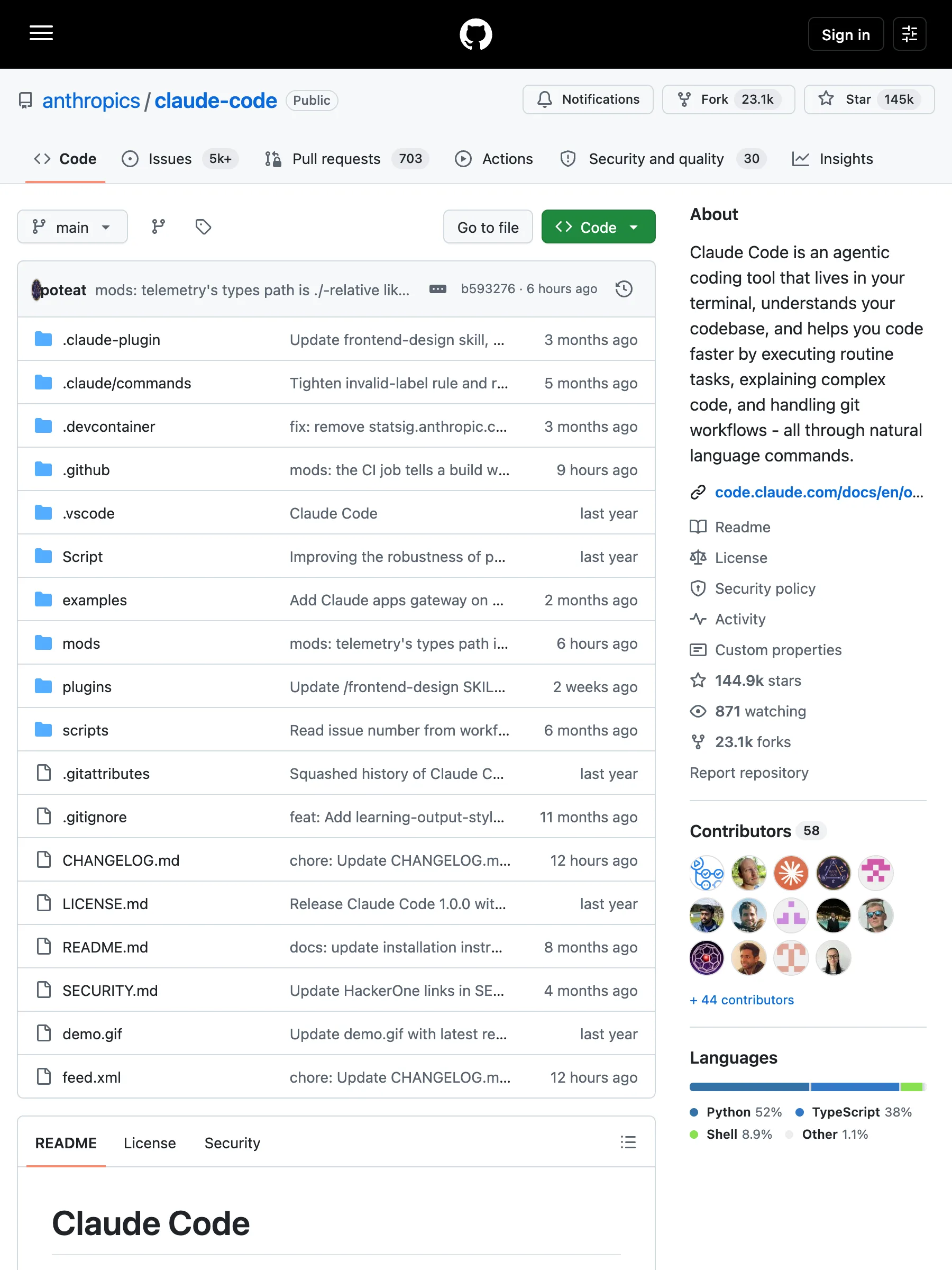
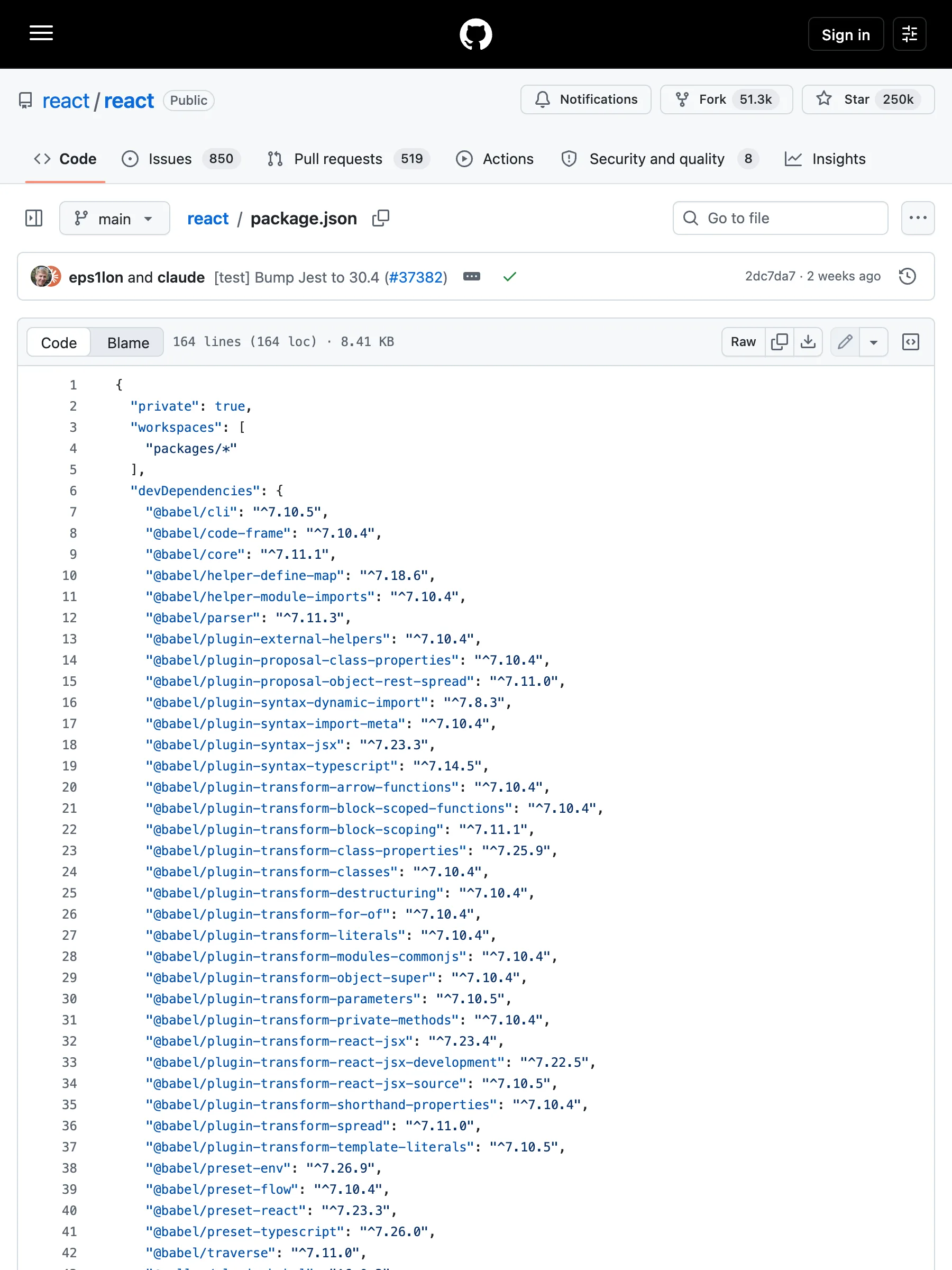
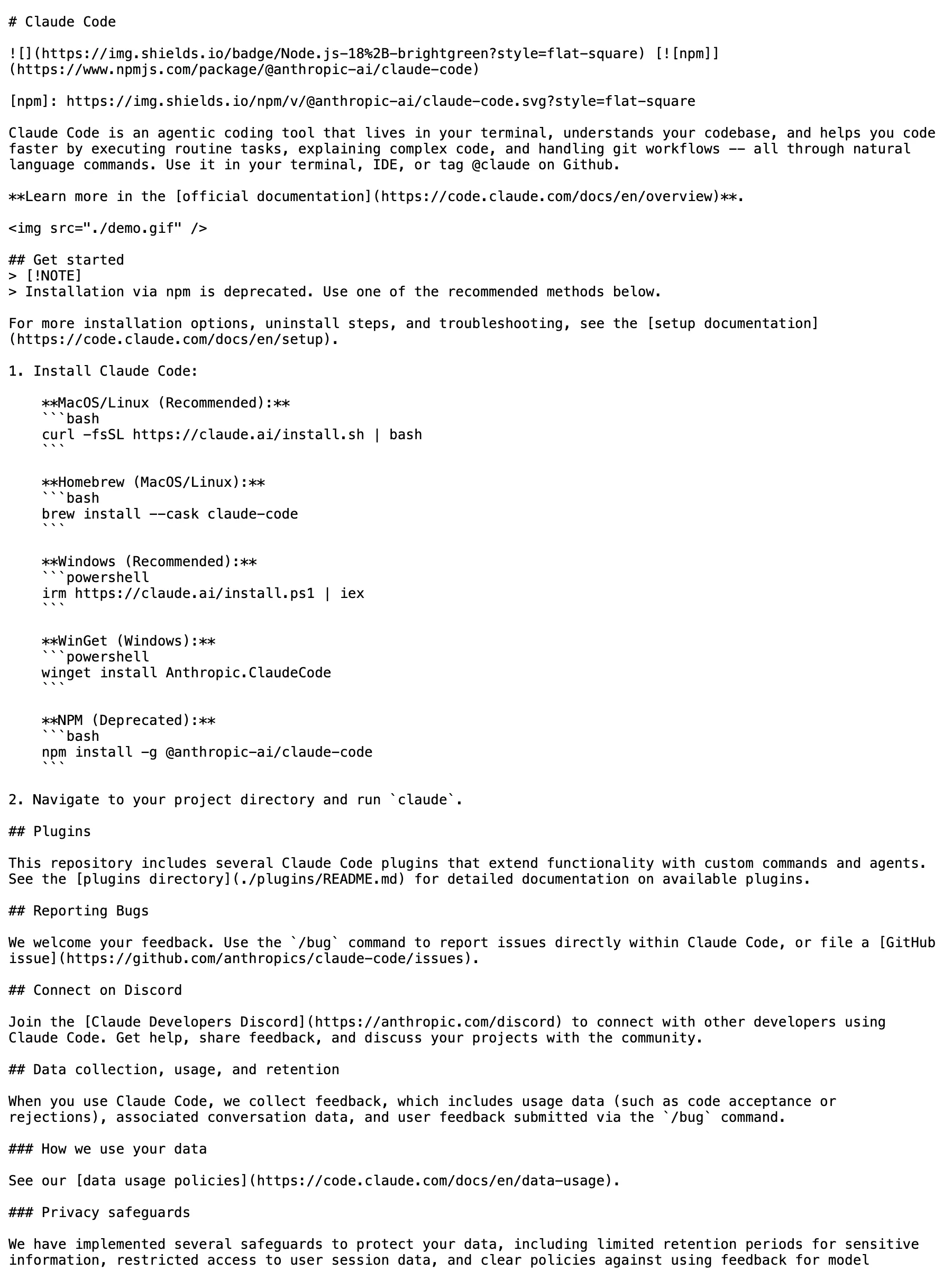
3 つの URL タイプ。左は GitHub が匿名訪問者に実際に配信する公開ページのスクリーンショット(クローラーと同じ経路で撮影)、右は API が返す results.content の全文です。

リポジトリgithub.com/anthropics/claude-code

GitHub が返すもの

匿名訪問者に配信される anthropics/claude-code リポジトリページ

335 KB の HTML — ファイルツリー、サイドバー、ナビ chrome 込み

API が返すもの

markdown
# Claude Code
[![npm]](https://www.npmjs.com/package/@anthropic-ai/claude-code)
[npm]: https://img.shields.io/npm/v/@anthropic-ai/claude-code.svg?style=flat-square
Claude Code is an agentic coding tool that lives in your terminal, understands your codebase, and helps you code faster by executing routine tasks, explaining complex code, and handling git workflows -- all through natural language commands. Use it in your terminal, IDE, or tag @claude on Github.
**Learn more in the [official documentation](https://code.claude.com/docs/en/overview)**.
<img src="./demo.gif" />
## Get started
> [!NOTE]
> Installation via npm is deprecated. Use one of the recommended methods below.
For more installation options, uninstall steps, and troubleshooting, see the [setup documentation](https://code.claude.com/docs/en/setup).
1. Install Claude Code:
**MacOS/Linux (Recommended):**
```bash
curl -fsSL https://claude.ai/install.sh | bash
```
**Homebrew (MacOS/Linux):**
```bash
brew install --cask claude-code
```
**Windows (Recommended):**
```powershell
irm https://claude.ai/install.ps1 | iex
```
**WinGet (Windows):**
```powershell
winget install Anthropic.ClaudeCode
```
**NPM (Deprecated):**
```bash
npm install -g @anthropic-ai/claude-code
```
2. Navigate to your project directory and run `claude`.
## Plugins
This repository includes several Claude Code plugins that extend functionality with custom commands and agents. See the [plugins directory](./plugins/README.md) for detailed documentation on available plugins.
## Reporting Bugs
We welcome your feedback. Use the `/bug` command to report issues directly within Claude Code, or file a [GitHub issue](https://github.com/anthropics/claude-code/issues).
## Connect on Discord
Join the [Claude Developers Discord](https://anthropic.com/discord) to connect with other developers using Claude Code. Get help, share feedback, and discuss your projects with the community.
## Data collection, usage, and retention
When you use Claude Code, we collect feedback, which includes usage data (such as code acceptance or rejections), associated conversation data, and user feedback submitted via the `/bug` command.
### How we use your data
See our [data usage policies](https://code.claude.com/docs/en/data-usage).
### Privacy safeguards
We have implemented several safeguards to protect your data, including limited retention periods for sensitive information, restricted access to user session data, and clear policies against using feedback for model training.
For full details, please review our [Commercial Terms of Service](https://www.anthropic.com/legal/commercial-terms) and [Privacy Policy](https://www.anthropic.com/legal/privacy).

README の Markdown — 2.8 KB、そのまま索引化可能

ファイルビューgithub.com/facebook/react/blob/main/package.json

GitHub が返すもの

匿名訪問者に配信される facebook/react の package.json ファイルビュー

351 KB の HTML — 行番号、blame バー、編集ボタン込み

API が返すもの

markdown
# package.json
```json
{
"private": true,
"workspaces": [
"packages/*"
],
"devDependencies": {
"@babel/cli": "^7.10.5",
"@babel/code-frame": "^7.10.4",
"@babel/core": "^7.11.1",
"@babel/helper-define-map": "^7.18.6",
"@babel/helper-module-imports": "^7.10.4",
"@babel/parser": "^7.11.3",
"@babel/plugin-external-helpers": "^7.10.4",
"@babel/plugin-proposal-class-properties": "^7.10.4",
"@babel/plugin-proposal-object-rest-spread": "^7.11.0",
"@babel/plugin-syntax-dynamic-import": "^7.8.3",
"@babel/plugin-syntax-import-meta": "^7.10.4",
"@babel/plugin-syntax-jsx": "^7.23.3",
"@babel/plugin-syntax-typescript": "^7.14.5",
"@babel/plugin-transform-arrow-functions": "^7.10.4",
"@babel/plugin-transform-block-scoped-functions": "^7.10.4",
"@babel/plugin-transform-block-scoping": "^7.11.1",
"@babel/plugin-transform-class-properties": "^7.25.9",
"@babel/plugin-transform-classes": "^7.10.4",
"@babel/plugin-transform-destructuring": "^7.10.4",
"@babel/plugin-transform-for-of": "^7.10.4",
"@babel/plugin-transform-literals": "^7.10.4",
"@babel/plugin-transform-modules-commonjs": "^7.10.4",
"@babel/plugin-transform-object-super": "^7.10.4",
"@babel/plugin-transform-parameters": "^7.10.5",
"@babel/plugin-transform-private-methods": "^7.10.4",
"@babel/plugin-transform-react-jsx": "^7.23.4",
"@babel/plugin-transform-react-jsx-development": "^7.22.5",
"@babel/plugin-transform-react-jsx-source": "^7.10.5",
"@babel/plugin-transform-shorthand-properties": "^7.10.4",
"@babel/plugin-transform-spread": "^7.11.0",
"@babel/plugin-transform-template-literals": "^7.10.5",
"@babel/preset-env": "^7.26.9",
"@babel/preset-flow": "^7.10.4",
"@babel/preset-react": "^7.23.3",
"@babel/preset-typescript": "^7.26.0",
"@babel/traverse": "^7.11.0",
"@rollup/plugin-babel": "^6.0.3",
"@rollup/plugin-commonjs": "^24.0.1",
"@rollup/plugin-node-resolve": "^15.0.1",
"@rollup/plugin-replace": "^5.0.2",
"@rollup/plugin-typescript": "^12.1.2",
"@types/invariant": "^2.2.35",
"@typescript-eslint/eslint-plugin": "^6.21.0",
"@typescript-eslint/parser": "^6.21.0",
"abortcontroller-polyfill": "^1.7.5",
"art": "0.10.1",
"babel-jest": "^30.4.1",
"babel-plugin-syntax-hermes-parser": "^0.36.1",
"babel-plugin-syntax-trailing-function-commas": "^6.5.0",
"busboy": "^1.6.0",
"chalk": "^3.0.0",
"cli-table": "^0.3.1",
"coffee-script": "^1.12.7",
"confusing-browser-globals": "^1.0.9",
"core-js": "^3.6.4",
"create-react-class": "^15.6.3",
"error-stack-parser": "^2.0.6",
"eslint": "^7.7.0",
"eslint-config-prettier": "^6.9.0",
"eslint-plugin-babel": "^5.3.0",
"eslint-plugin-es": "^4.1.0",
"eslint-plugin-eslint-plugin": "^3.5.3",
"eslint-plugin-ft-flow": "^2.0.3",
"eslint-plugin-jest": "28.4.0",
"eslint-plugin-no-for-of-loops": "^1.0.0",
"eslint-plugin-no-function-declare-after-return": "^1.0.0",
"eslint-plugin-react": "^6.7.1",
"eslint-plugin-react-hooks-published": "npm:eslint-plugin-react-hooks@^5.2.0",
"eslint-plugin-react-internal": "link:./scripts/eslint-rules",
"fbjs-scripts": "^3.0.1",
"filesize": "^6.0.1",
"flow-bin": "^0.317.0",
"flow-remove-types": "^2.317.0",
"flow-typed": "^4.1.1",
"glob": "^7.1.6",
"glob-stream": "^6.1.0",
"google-closure-compiler": "^20230206.0.0",
"gzip-size": "^5.1.1",
"hermes-eslint": "^0.36.1",
"hermes-parser": "^0.36.1",
"jest": "^30.4.1",
"jest-cli": "^30.4.1",
"jest-diff": "^30.4.1",
"jest-environment-jsdom": "^30.4.1",
"jest-silent-reporter": "^0.6.0",
"jest-snapshot-serializer-raw": "^1.2.0",
"minimatch": "^3.0.4",
"minimist": "^1.2.3",
"mkdirp": "^0.5.1",
"ncp": "^2.0.0",
"prettier": "^3.3.3",
"prettier-plugin-hermes-parser": "^0.36.1",
"pretty-format": "^30.4.1",
"prop-types": "^15.6.2",
"random-seed": "^0.3.0",
"react-lifecycles-compat": "^3.0.4",
"rimraf": "^3.0.0",
"rollup": "^3.29.5",
"rollup-plugin-dts": "^6.1.1",
"rollup-plugin-prettier": "^4.1.1",
"rollup-plugin-strip-banner": "^3.0.0",
"semver": "^7.1.1",
"shelljs": "^0.8.5",
"signedsource": "^2.0.0",
"targz": "^1.0.1",
"through2": "^3.0.1",
"tmp": "^0.1.0",
"to-fast-properties": "^2.0.0",
"tsup": "^8.4.0",
"typescript": "^5.4.3",
"undici": "^5.28.4",
"web-streams-polyfill": "^3.1.1",
"yargs": "^15.3.1"
},
"jest": {
"testRegex": "/scripts/jest/dont-run-jest-directly\\.js$"
},
"scripts": {
"prebuild": "./scripts/react-compiler/link-compiler.sh",
"build": "node ./scripts/rollup/build-all-release-channels.js",
"build-for-devtools": "cross-env yarn build react/index,react/jsx,react/compiler-runtime,react-dom/index,react-dom/client,react-dom/unstable_testing,react-dom/test-utils,react-is,react-debug-tools,scheduler,react-test-renderer,react-refresh,react-art --type=NODE --release-channel=experimental",
"build-for-devtools-dev": "yarn build-for-devtools --type=NODE_DEV",
"build-for-devtools-prod": "yarn build-for-devtools --type=NODE_PROD",
"build-for-flight-dev": "cross-env RELEASE_CHANNEL=experimental node ./scripts/rollup/build.js react/index,react/jsx,react.react-server,react-dom/index,react-dom/client,react-dom/server,react-dom.react-server,react-dom-server.node,react-dom-server-legacy.node,scheduler,react-server-dom-webpack/,react-server-dom-unbundled/ --type=NODE_DEV,ESM_PROD,NODE_ES2015 && mv ./build/node_modules ./build/oss-experimental",
"build-for-flight-prod": "cross-env RELEASE_CHANNEL=experimental node ./scripts/rollup/build.js react/index,react/jsx,react.react-server,react-dom/index,react-dom/client,react-dom/server,react-dom.react-server,react-dom-server.node,react-dom-server-legacy.node,scheduler,react-server-dom-webpack/,react-server-dom-unbundled/ --type=NODE_PROD,ESM_PROD,NODE_ES2015 && mv ./build/node_modules ./build/oss-experimental",
"build-for-vt-dev": "cross-env RELEASE_CHANNEL=experimental node ./scripts/rollup/build.js react/index,react/jsx,react-dom/index,react-dom/client,react-dom/server,react-dom-server.node,react-dom-server-legacy.node,scheduler --type=NODE_DEV && mv ./build/node_modules ./build/oss-experimental",
"flow-typed-install": "yarn flow-typed install --skip --skipFlowRestart --ignore-deps=dev",
"linc": "node ./scripts/tasks/linc.js",
"lint": "node ./scripts/tasks/eslint.js",
"lint-build": "node ./scripts/rollup/validate/index.js",
"extract-errors": "node scripts/error-codes/extract-errors.js",
"postinstall": "node ./scripts/flow/createFlowConfigs.js",
"test": "node ./scripts/jest/jest-cli.js",
"test-stable": "node ./scripts/jest/jest-cli.js --release-channel=stable",
"test-www": "node ./scripts/jest/jest-cli.js --release-channel=www-modern",
"test-classic": "node ./scripts/jest/jest-cli.js --release-channel=www-classic",
"test-build-devtools": "node ./scripts/jest/jest-cli.js --build --project devtools --release-channel=experimental",
"test-dom-fixture": "cd fixtures/dom && yarn && yarn test",
"flow": "node ./scripts/tasks/flow.js",
"flow-ci": "node ./scripts/tasks/flow-ci.js",
"prettier": "node ./scripts/prettier/index.js write-changed",
"prettier-all": "node ./scripts/prettier/index.js write",
"prettier-check": "node ./scripts/prettier/index.js",
"version-check": "node ./scripts/tasks/version-check.js",
"publish-prereleases": "echo 'This command has been deprecated. Please refer to https://github.com/facebook/react/tree/main/scripts/release#trigger-an-automated-prerelease'",
"download-build": "node ./scripts/release/download-experimental-build.js",
"download-build-for-head": "node ./scripts/release/download-experimental-build.js --commit=$(git rev-parse HEAD)",
"download-build-in-codesandbox-ci": "yarn build --type=node react/index react.react-server react-dom/index react-dom/client react-dom/src/server react-dom/test-utils react-dom.react-server scheduler/index react/jsx-runtime react/jsx-dev-runtime react-server-dom-webpack",
"check-release-dependencies": "node ./scripts/release/check-release-dependencies",
"generate-inline-fizz-runtime": "node ./scripts/rollup/generate-inline-fizz-runtime.js",
"generate-changelog": "node ./scripts/tasks/generate-changelog/index.js",
"flags": "node ./scripts/flags/flags.js"
},
"resolutions": {
"react-is": "npm:react-is"
},
"packageManager": "yarn@1.22.22"
}
```

フェンス付きコードブロック — 8.6 KB のソース

Raw ファイルraw.githubusercontent.com/anthropics/claude-code/main/README.md

GitHub が返すもの

raw.githubusercontent.com から配信される README.md 生ファイル

3 KB — 生ファイルは最初からプレーンテキスト

API が返すもの

markdown
# Claude Code
[![npm]](https://www.npmjs.com/package/@anthropic-ai/claude-code)
[npm]: https://img.shields.io/npm/v/@anthropic-ai/claude-code.svg?style=flat-square
Claude Code is an agentic coding tool that lives in your terminal, understands your codebase, and helps you code faster by executing routine tasks, explaining complex code, and handling git workflows -- all through natural language commands. Use it in your terminal, IDE, or tag @claude on Github.
**Learn more in the [official documentation](https://code.claude.com/docs/en/overview)**.
<img src="./demo.gif" />
## Get started
> [!NOTE]
> Installation via npm is deprecated. Use one of the recommended methods below.
For more installation options, uninstall steps, and troubleshooting, see the [setup documentation](https://code.claude.com/docs/en/setup).
1. Install Claude Code:
**MacOS/Linux (Recommended):**
```bash
curl -fsSL https://claude.ai/install.sh | bash
```
**Homebrew (MacOS/Linux):**
```bash
brew install --cask claude-code
```
**Windows (Recommended):**
```powershell
irm https://claude.ai/install.ps1 | iex
```
**WinGet (Windows):**
```powershell
winget install Anthropic.ClaudeCode
```
**NPM (Deprecated):**
```bash
npm install -g @anthropic-ai/claude-code
```
2. Navigate to your project directory and run `claude`.
## Plugins
This repository includes several Claude Code plugins that extend functionality with custom commands and agents. See the [plugins directory](./plugins/README.md) for detailed documentation on available plugins.
## Reporting Bugs
We welcome your feedback. Use the `/bug` command to report issues directly within Claude Code, or file a [GitHub issue](https://github.com/anthropics/claude-code/issues).
## Connect on Discord
Join the [Claude Developers Discord](https://anthropic.com/discord) to connect with other developers using Claude Code. Get help, share feedback, and discuss your projects with the community.
## Data collection, usage, and retention
When you use Claude Code, we collect feedback, which includes usage data (such as code acceptance or rejections), associated conversation data, and user feedback submitted via the `/bug` command.
### How we use your data
See our [data usage policies](https://code.claude.com/docs/en/data-usage).
### Privacy safeguards
We have implemented several safeguards to protect your data, including limited retention periods for sensitive information, restricted access to user session data, and clear policies against using feedback for model training.
For full details, please review our [Commercial Terms of Service](https://www.anthropic.com/legal/commercial-terms) and [Privacy Policy](https://www.anthropic.com/legal/privacy).

Verbatim — 2.8 KB、バイト同一の Markdown

URL パターン別の対応状況

GitHub 対応はドメイン単位ではなく URL パターン単位で計測しています。表の各行は本番クローラーで検証済みです。

URL パターンステータス取得できる内容
/<owner>/<repo>
対応
リポジトリの README をクリーンな Markdown で — ページ chrome ではなくドキュメント本体。
/<owner>/<repo>/blob/<ref>/<path>
対応
ファイル本文をフェンス付きコードブロックで — レンダリング HTML ではなく実ソース。
raw.githubusercontent.com/* · gist raw
対応
Raw ファイルは verbatim で返却 — テキストはテキストのまま。

ページ chrome なしで GitHub コンテンツを取得

Crawl エンドポイントに GitHub URL を渡すと、ページの用途を知っているコンバーターにルーティングされます。リポジトリページは README を、ファイルビューはファイルを、raw URL は配信されたバイトをそのまま返します。ナビ、ファイルツリー、サイドバーの chrome がパイプラインに届くことはありません。

ページではなく成果物

リポジトリページはファイルを見せるためのもの — コンバーターは訪問者が実際に読む README だけを返し、周囲の chrome は除きます。

ソースはソースのまま

ファイルビューはフェンス付きコードブロック、raw URL は verbatim で返却 — インデントも書式も往復で壊れません。

正直な境界線

Issue、PR、プロフィールページは対象外 — 専用パスにクリーンな答えがないパターンはマトリクスに載せません。

URL パターンごとに実測

表の各行は実際の URL をライブでクロールして再現したもの — ドメイン単位の主張ではなく、パターン単位の実測です。

GitHub スクレイパー API とは?

GitHub スクレイパー API は、GitHub URL を受け取りページの実コンテンツを構造化されたモデル向け形式で返す HTTP インターフェースです。GitHub のページは重く、リポジトリビューは 1 つの README の周りにファイルツリー・サイドバー・ナビが積み重なっています。Search1API の Crawl エンドポイントは URL 形状ごとに成果物へ対応付けるコンバーターを使います:リポジトリは README、ファイルビューはフェンス付きソース、raw ファイルは verbatim。サイトごとのクリーンアップルールを書かずに、そのまま索引化・モデル投入できるコンテンツが返ります。

実装の流れ

典型的なワークフロー

GitHub の公開 URL を Crawl エンドポイントに送るだけ。リポジトリページは README、ファイルビューはフェンス付きソース、raw URL はファイルそのままが返ります。GitHub アカウントは不要です。

1

GitHub URL を Crawl エンドポイントに POST — GitHub アカウントは不要。

2

URL がパターンルールに照合され、GitHub コンバーターにルーティングされます。

3

リポジトリは README Markdown、ファイルビューはフェンス付きソース、raw URL はファイル verbatim で返却。

4

クリーンな答えのないパターンは対象外 — マトリクスがライブリクエストで検証済みの境界線です。

利用シーン

依存ツリーや組織の公開リポジトリの README を取り込み、ドキュメント検索へ。

ソースファイルをフェンス・シンタックス付きブロックとしてコード対応パイプラインへ。

アップストリームプロジェクトの追跡 — リポジトリ URL は呼ぶたびに最新 README を返します。

raw の設定・ドキュメントファイルを HTML クリーンアップなしで検索基盤へ。

FAQ

GitHub アカウントやトークンは必要ですか?

不要です — ここで扱うのは匿名訪問者が開ける公開ページだけです。プライベートリポジトリやログインが必要なものは対象外です。

どの GitHub URL に対応していますか?

リポジトリルート、blob ファイルビュー、raw.githubusercontent.com の URL に対応。Issue、PR、リリース、プロフィールページは検証済みマトリクスに含まれません。

リポジトリページは何を返しますか?

README をクリーンな Markdown で返します — 読者が求める成果物です。ファイル一覧、サイドバー、ナビゲーション chrome は専用コンバーターが除去します。

GitHub API との違いは?

REST API は実用的なレート制限にはトークンが必要で、返るのは自分でレンダリングするかファイル単位で取得し直す JSON です。こちらは手持ちの URL をそのまま投げると、読める成果物が 1 コールで返ります — Markdown in、Markdown out。

モノレポや大きなファイルは扱えますか?

ファイルビューはリポジトリ構造に関係なくファイル本文を返します。非常に大きなファイルは他の Crawl レスポンスと同じコンテンツサイズ制限に従います。

GitHub のスクレイピングは合法ですか?

当社が取得するのは GitHub が匿名訪問者に提供するコンテンツのみです — ログイン、セッション共有、アクセス制御の回避は行いません。特定の用途が法や GitHub の規約に適合するかは管轄と用途次第なので、自社の法務にご確認ください。